ヤミRoot VoidGate
User / IP
:
216.73.216.143
Host / Server
:
146.88.233.70 / dev.loger.cm
System
:
Linux hybrid1120.fr.ns.planethoster.net 3.10.0-957.21.2.el7.x86_64 #1 SMP Wed Jun 5 14:26:44 UTC 2019 x86_64
Command
|
Upload
|
Create
Mass Deface
|
Jumping
|
Symlink
|
Reverse Shell
Ping
|
Port Scan
|
DNS Lookup
|
Whois
|
Header
|
cURL
:
/
home
/
logercm
/
dev.loger.cm
/
fixtures
/
assert
/
Viewing: README.md.tar
home/logercm/dev.loger.cm/node_modules/is-core-module/README.md000064400000003173151200241420020162 0ustar00# is-core-module <sup>[![Version Badge][2]][1]</sup> [![github actions][actions-image]][actions-url] [![coverage][codecov-image]][codecov-url] [![dependency status][5]][6] [![dev dependency status][7]][8] [![License][license-image]][license-url] [![Downloads][downloads-image]][downloads-url] [![npm badge][11]][1] Is this specifier a node.js core module? Optionally provide a node version to check; defaults to the current node version. ## Example ```js var isCore = require('is-core-module'); var assert = require('assert'); assert(isCore('fs')); assert(!isCore('butts')); ``` ## Tests Clone the repo, `npm install`, and run `npm test` [1]: https://npmjs.org/package/is-core-module [2]: https://versionbadg.es/inspect-js/is-core-module.svg [5]: https://david-dm.org/inspect-js/is-core-module.svg [6]: https://david-dm.org/inspect-js/is-core-module [7]: https://david-dm.org/inspect-js/is-core-module/dev-status.svg [8]: https://david-dm.org/inspect-js/is-core-module#info=devDependencies [11]: https://nodei.co/npm/is-core-module.png?downloads=true&stars=true [license-image]: https://img.shields.io/npm/l/is-core-module.svg [license-url]: LICENSE [downloads-image]: https://img.shields.io/npm/dm/is-core-module.svg [downloads-url]: https://npm-stat.com/charts.html?package=is-core-module [codecov-image]: https://codecov.io/gh/inspect-js/is-core-module/branch/main/graphs/badge.svg [codecov-url]: https://app.codecov.io/gh/inspect-js/is-core-module/ [actions-image]: https://img.shields.io/endpoint?url=https://github-actions-badge-u3jn4tfpocch.runkit.sh/inspect-js/is-core-module [actions-url]: https://github.com/inspect-js/is-core-module/actions home/logercm/dev.loger.cm/node_modules/default-gateway/README.md000064400000003422151200705740020430 0ustar00# default-gateway [](https://www.npmjs.org/package/default-gateway) [](https://www.npmjs.org/package/default-gateway) Obtains the machine's default gateway through `exec` calls to OS routing interfaces. - On Linux and Android, the `ip` command must be available (usually provided by the `iproute2` package). - On Windows, `wmic` must be available. - On IBM i, the `db2util` command must be available (provided by the `db2util` package). - On Unix (and macOS), the `netstat` command must be available. ## Installation ``` $ npm i default-gateway ``` ## Example ```js const defaultGateway = require('default-gateway'); const {gateway, interface} = await defaultGateway.v4(); // gateway = '1.2.3.4', interface = 'en1' const {gateway, interface} = await defaultGateway.v6(); // gateway = '2001:db8::1', interface = 'en2' const {gateway, interface} = defaultGateway.v4.sync(); // gateway = '1.2.3.4', interface = 'en1' const {gateway, interface} = defaultGateway.v6.sync(); // gateway = '2001:db8::1', interface = 'en2' ``` ## API ### defaultGateway.v4() ### defaultGateway.v6() ### defaultGateway.v4.sync() ### defaultGateway.v6.sync() Returns: `result` *Object* - `gateway`: The IP address of the default gateway. - `interface`: The name of the interface. On Windows, this is the network adapter name. The `.v{4,6}()` methods return a Promise while the `.v{4,6}.sync()` variants will return the result synchronously. The `gateway` property will always be defined on success, while `interface` can be `null` if it cannot be determined. All methods reject/throw on unexpected conditions. ## License © [silverwind](https://github.com/silverwind), distributed under BSD licence home/logercm/dev.loger.cm/node_modules/babel-loader/README.md000064400000032022151201346040017647 0ustar00> This README is for babel-loader v8 + Babel v7 > If you are using legacy Babel v6, see the [7.x branch](https://github.com/babel/babel-loader/tree/7.x) docs [](https://www.npmjs.com/package/babel-loader) [](https://codecov.io/gh/babel/babel-loader) <div align="center"> <a href="https://github.com/babel/babel"> <img src="https://rawgit.com/babel/logo/master/babel.svg" alt="Babel logo" width="200" height="200"> </a> <a href="https://github.com/webpack/webpack"> <img src="https://webpack.js.org/assets/icon-square-big.svg" alt="webpack logo" width="200" height="200"> </a> </div> <h1 align="center">Babel Loader</h1> This package allows transpiling JavaScript files using [Babel](https://github.com/babel/babel) and [webpack](https://github.com/webpack/webpack). **Note**: Issues with the output should be reported on the Babel [Issues](https://github.com/babel/babel/issues) tracker. <h2 align="center">Install</h2> > webpack `4.x || 5.x` | babel-loader 8.x | babel 7.x ```bash npm install -D babel-loader @babel/core @babel/preset-env webpack ``` <h2 align="center">Usage</h2> webpack documentation: [Loaders](https://webpack.js.org/loaders/) Within your webpack configuration object, you'll need to add the babel-loader to the list of modules, like so: ```javascript module: { rules: [ { test: /\.m?js$/, exclude: /node_modules/, use: { loader: 'babel-loader', options: { presets: [ ['@babel/preset-env', { targets: "defaults" }] ] } } } ] } ``` ### Options See the `babel` [options](https://babeljs.io/docs/en/options). You can pass options to the loader by using the [`options`](https://webpack.js.org/configuration/module/#ruleoptions--rulequery) property: ```javascript module: { rules: [ { test: /\.m?js$/, exclude: /node_modules/, use: { loader: 'babel-loader', options: { presets: [ ['@babel/preset-env', { targets: "defaults" }] ], plugins: ['@babel/plugin-proposal-class-properties'] } } } ] } ``` This loader also supports the following loader-specific option: * `cacheDirectory`: Default `false`. When set, the given directory will be used to cache the results of the loader. Future webpack builds will attempt to read from the cache to avoid needing to run the potentially expensive Babel recompilation process on each run. If the value is set to `true` in options (`{cacheDirectory: true}`), the loader will use the default cache directory in `node_modules/.cache/babel-loader` or fallback to the default OS temporary file directory if no `node_modules` folder could be found in any root directory. * `cacheIdentifier`: Default is a string composed by the `@babel/core`'s version, the `babel-loader`'s version, the contents of `.babelrc` file if it exists, and the value of the environment variable `BABEL_ENV` with a fallback to the `NODE_ENV` environment variable. This can be set to a custom value to force cache busting if the identifier changes. * `cacheCompression`: Default `true`. When set, each Babel transform output will be compressed with Gzip. If you want to opt-out of cache compression, set it to `false` -- your project may benefit from this if it transpiles thousands of files. * `customize`: Default `null`. The path of a module that exports a `custom` callback [like the one that you'd pass to `.custom()`](#customized-loader). Since you already have to make a new file to use this, it is recommended that you instead use `.custom` to create a wrapper loader. Only use this if you _must_ continue using `babel-loader` directly, but still want to customize. * `metadataSubscribers`: Default `[]`. Takes an array of context function names. E.g. if you passed ['myMetadataPlugin'], you'd assign a subscriber function to `context.myMetadataPlugin` within your webpack plugin's hooks & that function will be called with `metadata`. ## Troubleshooting ### babel-loader is slow! Make sure you are transforming as few files as possible. Because you are probably matching `/\.m?js$/`, you might be transforming the `node_modules` folder or other unwanted source. To exclude `node_modules`, see the `exclude` option in the `loaders` config as documented above. You can also speed up babel-loader by as much as 2x by using the `cacheDirectory` option. This will cache transformations to the filesystem. ### Some files in my node_modules are not transpiled for IE 11 Although we typically recommend not compiling `node_modules`, you may need to when using libraries that do not support IE 11. For this, you can either use a combination of `test` and `not`, or [pass a function](https://webpack.js.org/configuration/module/#condition) to your `exclude` option. You can also use negative lookahead regex as suggested [here](https://github.com/webpack/webpack/issues/2031#issuecomment-294706065). ```javascript { test: /\.m?js$/, exclude: { and: [/node_modules/], // Exclude libraries in node_modules ... not: [ // Except for a few of them that needs to be transpiled because they use modern syntax /unfetch/, /d3-array|d3-scale/, /@hapi[\\/]joi-date/, ] }, use: { loader: 'babel-loader', options: { presets: [ ['@babel/preset-env', { targets: "ie 11" }] ] } } } ``` ### Babel is injecting helpers into each file and bloating my code! Babel uses very small helpers for common functions such as `_extend`. By default, this will be added to every file that requires it. You can instead require the Babel runtime as a separate module to avoid the duplication. The following configuration disables automatic per-file runtime injection in Babel, requiring `@babel/plugin-transform-runtime` instead and making all helper references use it. See the [docs](https://babeljs.io/docs/plugins/transform-runtime/) for more information. **NOTE**: You must run `npm install -D @babel/plugin-transform-runtime` to include this in your project and `@babel/runtime` itself as a dependency with `npm install @babel/runtime`. ```javascript rules: [ // the 'transform-runtime' plugin tells Babel to // require the runtime instead of inlining it. { test: /\.m?js$/, exclude: /node_modules/, use: { loader: 'babel-loader', options: { presets: [ ['@babel/preset-env', { targets: "defaults" }] ], plugins: ['@babel/plugin-transform-runtime'] } } } ] ``` #### **NOTE**: transform-runtime & custom polyfills (e.g. Promise library) Since [@babel/plugin-transform-runtime](https://github.com/babel/babel/tree/main/packages/babel-plugin-transform-runtime) includes a polyfill that includes a custom [regenerator-runtime](https://github.com/facebook/regenerator/blob/master/packages/regenerator-runtime/runtime.js) and [core-js](https://github.com/zloirock/core-js), the following usual shimming method using `webpack.ProvidePlugin` will not work: ```javascript // ... new webpack.ProvidePlugin({ 'Promise': 'bluebird' }), // ... ``` The following approach will not work either: ```javascript require('@babel/runtime/core-js/promise').default = require('bluebird'); var promise = new Promise; ``` which outputs to (using `runtime`): ```javascript 'use strict'; var _Promise = require('@babel/runtime/core-js/promise')['default']; require('@babel/runtime/core-js/promise')['default'] = require('bluebird'); var promise = new _Promise(); ``` The previous `Promise` library is referenced and used before it is overridden. One approach is to have a "bootstrap" step in your application that would first override the default globals before your application: ```javascript // bootstrap.js require('@babel/runtime/core-js/promise').default = require('bluebird'); // ... require('./app'); ``` ### The Node.js API for `babel` has been moved to `babel-core`. If you receive this message, it means that you have the npm package `babel` installed and are using the short notation of the loader in the webpack config (which is not valid anymore as of webpack 2.x): ```javascript { test: /\.m?js$/, loader: 'babel', } ``` webpack then tries to load the `babel` package instead of the `babel-loader`. To fix this, you should uninstall the npm package `babel`, as it is deprecated in Babel v6. (Instead, install `@babel/cli` or `@babel/core`.) In the case one of your dependencies is installing `babel` and you cannot uninstall it yourself, use the complete name of the loader in the webpack config: ```javascript { test: /\.m?js$/, loader: 'babel-loader', } ``` ### Exclude libraries that should not be transpiled `core-js` and `webpack/buildin` will cause errors if they are transpiled by Babel. You will need to exclude them form `babel-loader`. ```js { "loader": "babel-loader", "options": { "exclude": [ // \\ for Windows, / for macOS and Linux /node_modules[\\/]core-js/, /node_modules[\\/]webpack[\\/]buildin/, ], "presets": [ "@babel/preset-env" ] } } ``` ### Top level function (IIFE) is still arrow (on Webpack 5) That function is injected by Webpack itself _after_ running `babel-loader`. By default Webpack asumes that your target environment supports some ES2015 features, but you can overwrite this behavior using the `output.environment` Webpack option ([documentation](https://webpack.js.org/configuration/output/#outputenvironment)). To avoid the top-level arrow function, you can use `output.environment.arrowFunction`: ```js // webpack.config.js module.exports = { // ... output: { // ... environment: { // ... arrowFunction: false, // <-- this line does the trick }, }, }; ``` ## Customize config based on webpack target Webpack supports bundling multiple [targets](https://webpack.js.org/concepts/targets/). For cases where you may want different Babel configurations for each target (like `web` _and_ `node`), this loader provides a `target` property via Babel's [caller](https://babeljs.io/docs/en/config-files#apicallercb) API. For example, to change the environment targets passed to `@babel/preset-env` based on the webpack target: ```javascript // babel.config.js module.exports = api => { return { plugins: [ "@babel/plugin-proposal-nullish-coalescing-operator", "@babel/plugin-proposal-optional-chaining" ], presets: [ [ "@babel/preset-env", { useBuiltIns: "entry", // caller.target will be the same as the target option from webpack targets: api.caller(caller => caller && caller.target === "node") ? { node: "current" } : { chrome: "58", ie: "11" } } ] ] } } ``` ## Customized Loader `babel-loader` exposes a loader-builder utility that allows users to add custom handling of Babel's configuration for each file that it processes. `.custom` accepts a callback that will be called with the loader's instance of `babel` so that tooling can ensure that it using exactly the same `@babel/core` instance as the loader itself. In cases where you want to customize without actually having a file to call `.custom`, you may also pass the `customize` option with a string pointing at a file that exports your `custom` callback function. ### Example ```js // Export from "./my-custom-loader.js" or whatever you want. module.exports = require("babel-loader").custom(babel => { function myPlugin() { return { visitor: {}, }; } return { // Passed the loader options. customOptions({ opt1, opt2, ...loader }) { return { // Pull out any custom options that the loader might have. custom: { opt1, opt2 }, // Pass the options back with the two custom options removed. loader, }; }, // Passed Babel's 'PartialConfig' object. config(cfg) { if (cfg.hasFilesystemConfig()) { // Use the normal config return cfg.options; } return { ...cfg.options, plugins: [ ...(cfg.options.plugins || []), // Include a custom plugin in the options. myPlugin, ], }; }, result(result) { return { ...result, code: result.code + "\n// Generated by some custom loader", }; }, }; }); ``` ```js // And in your Webpack config module.exports = { // .. module: { rules: [{ // ... loader: path.join(__dirname, 'my-custom-loader.js'), // ... }] } }; ``` ### `customOptions(options: Object): { custom: Object, loader: Object }` Given the loader's options, split custom options out of `babel-loader`'s options. ### `config(cfg: PartialConfig): Object` Given Babel's `PartialConfig` object, return the `options` object that should be passed to `babel.transform`. ### `result(result: Result): Result` Given Babel's result object, allow loaders to make additional tweaks to it. ## License [MIT](https://couto.mit-license.org/) home/logercm/dev.loger.cm/node_modules/unpipe/README.md000064400000002342151201346400016640 0ustar00# unpipe [![NPM Version][npm-image]][npm-url] [![NPM Downloads][downloads-image]][downloads-url] [![Node.js Version][node-image]][node-url] [![Build Status][travis-image]][travis-url] [![Test Coverage][coveralls-image]][coveralls-url] Unpipe a stream from all destinations. ## Installation ```sh $ npm install unpipe ``` ## API ```js var unpipe = require('unpipe') ``` ### unpipe(stream) Unpipes all destinations from a given stream. With stream 2+, this is equivalent to `stream.unpipe()`. When used with streams 1 style streams (typically Node.js 0.8 and below), this module attempts to undo the actions done in `stream.pipe(dest)`. ## License [MIT](LICENSE) [npm-image]: https://img.shields.io/npm/v/unpipe.svg [npm-url]: https://npmjs.org/package/unpipe [node-image]: https://img.shields.io/node/v/unpipe.svg [node-url]: http://nodejs.org/download/ [travis-image]: https://img.shields.io/travis/stream-utils/unpipe.svg [travis-url]: https://travis-ci.org/stream-utils/unpipe [coveralls-image]: https://img.shields.io/coveralls/stream-utils/unpipe.svg [coveralls-url]: https://coveralls.io/r/stream-utils/unpipe?branch=master [downloads-image]: https://img.shields.io/npm/dm/unpipe.svg [downloads-url]: https://npmjs.org/package/unpipe home/logercm/dev.loger.cm/node_modules/multicast-dns/README.md000064400000010226151201346460020135 0ustar00# multicast-dns Low level multicast-dns implementation in pure javascript ``` npm install multicast-dns ``` [](http://travis-ci.org/mafintosh/multicast-dns) ## Usage ``` js var mdns = require('multicast-dns')() mdns.on('response', function(response) { console.log('got a response packet:', response) }) mdns.on('query', function(query) { console.log('got a query packet:', query) }) // lets query for an A record for 'brunhilde.local' mdns.query({ questions:[{ name: 'brunhilde.local', type: 'A' }] }) ``` Running the above (change `brunhilde.local` to `your-own-hostname.local`) will print an echo of the query packet first ``` js got a query packet: { type: 'query', questions: [ { name: 'brunhilde.local', type: 'A', class: 1 } ], answers: [], authorities: [], additionals: [] } ``` And then a response packet ``` js got a response packet: { type: 'response', questions: [], answers: [ { name: 'brunhilde.local', type: 'A', class: 'IN', ttl: 120, flush: true, data: '192.168.1.5' } ], authorities: [], additionals: [ { name: 'brunhilde.local', type: 'A', class: 'IN', ttl: 120, flush: true, data: '192.168.1.5' }, { name: 'brunhilde.local', type: 'AAAA', class: 'IN', ttl: 120, flush: true, data: 'fe80::5ef9:38ff:fe8c:ceaa' } ] } ``` # CLI ``` npm install -g multicast-dns ``` ``` multicast-dns brunhilde.local > 192.168.1.1 ``` # API A packet has the following format ``` js { questions: [{ name: 'brunhilde.local', type: 'A' }], answers: [{ name: 'brunhilde.local', type: 'A', ttl: seconds, data: (record type specific data) }], additionals: [ (same format as answers) ], authorities: [ (same format as answers) ] } ``` Currently data from `SRV`, `A`, `PTR`, `TXT`, `AAAA` and `HINFO` records is passed #### `mdns = multicastdns([options])` Creates a new `mdns` instance. Options can contain the following ``` js { multicast: true // use udp multicasting interface: '192.168.0.2' // explicitly specify a network interface. defaults to all port: 5353, // set the udp port ip: '224.0.0.251', // set the udp ip ttl: 255, // set the multicast ttl loopback: true, // receive your own packets reuseAddr: true // set the reuseAddr option when creating the socket (requires node >=0.11.13) } ``` #### `mdns.on('query', (packet, rinfo))` Emitted when a query packet is received. ``` js mdns.on('query', function(query) { if (query.questions[0] && query.questions[0].name === 'brunhilde.local') { mdns.respond(someResponse) // see below } }) ``` #### `mdns.on('response', (packet, rinfo))` Emitted when a response packet is received. The response might not be a response to a query you send as this is the result of someone multicasting a response. #### `mdns.query(packet, [cb])` Send a dns query. The callback will be called when the packet was sent. The following shorthands are equivalent ``` js mdns.query('brunhilde.local', 'A') mdns.query([{name:'brunhilde.local', type:'A'}]) mdns.query({ questions: [{name:'brunhilde.local', type:'A'}] }) ``` #### `mdns.respond(packet, [cb])` Send a dns response. The callback will be called when the packet was sent. ``` js // reply with a SRV and a A record as an answer mdns.respond({ answers: [{ name: 'my-service', type: 'SRV', data: { port: 9999, weight: 0, priority: 10, target: 'my-service.example.com' } }, { name: 'brunhilde.local', type: 'A', ttl: 300, data: '192.168.1.5' }] }) ``` The following shorthands are equivalent ``` js mdns.respond([{name:'brunhilde.local', type:'A', data:'192.158.1.5'}]) mdns.respond({ answers: [{name:'brunhilde.local', type:'A', data:'192.158.1.5'}] }) ``` #### `mdns.destroy()` Destroy the mdns instance. Closes the udp socket. # Development To start hacking on this module you can use this example to get started ``` git clone git://github.com/mafintosh/multicast-dns.git npm install node example.js node cli.js $(hostname).local ``` ## License MIT home/logercm/dev.loger.cm/node_modules/selfsigned/README.md000064400000020717151201346600017473 0ustar00Generate a self signed x509 certificate from node.js. ## Install ```bash npm install selfsigned ``` ## Usage ```js var selfsigned = require('selfsigned'); var attrs = [{ name: 'commonName', value: 'contoso.com' }]; var pems = selfsigned.generate(attrs, { days: 365 }); console.log(pems) ``` #### Async ```js selfsigned.generate(attrs, { days: 365 }, function (err, pems) { console.log(pems) }); ``` Will return the following like this: ```js { private: '-----BEGIN RSA PRIVATE KEY-----\r\nMIICXAIBAAKBgQCBFMXMYS/+RZz6+qzv+xeqXPdjw4YKZC4y3dPhSwgEwkecrCTX\r\nsR6boue+1MjIqPqWggXZnotIGldfEN0kn0Jbh2vMTrTx6YwqQ8tceBPoyuuqcYBO\r\nOONAcKOB3MLnZbyOgVtbyT3j68JE5V/lx6LhpIKAgY0m5WIuaKrW6mvLXQIDAQAB\r\nAoGAU6ODGxAqSecPdayyG/ml9vSwNAuAMgGB0eHcpZG5i2PbhRAh+0TAIXaoFQXJ\r\naAPeA2ISqlTJyRmQXYAO2uj61FzeyDzYCf0z3+yZEVz3cO7jB5Pl6iBvzbxWuuuA\r\ncbJtWLhWtW5/jioc8F0EAzZ+lkC/XuVJdwKHDmwt2qvJO+ECQQD+dvo1g3Sz9xGw\r\n21n+fDG5i4128+Qh+JPgh5AeLuXSofc1HMHaOXcC6Wu/Cloh7QAD934b7W0A7VoD\r\ndLd/JLyFAkEAgdwjryyvdhy69e516IrPB3b+m4rggtntBlZREMrk9tOzeIucVO3W\r\ntKI3FHm6JebN2gVcG+rZ+FaDPo+ifJkW+QJBAPojrMwEACmUevB2f9246gxx0UsY\r\nbq6yM3No71OsWEEY8/Bi53CEQqg7Gq5+F6H33qcHmBEN8LQTngN9rY+vZh0CQBg0\r\nqJImii5B/LeK03+dICoMDDmCEYdSh9P+ku3GZBd+Lp3xqBpMmxDgi9PNPN2DwCs7\r\nhIfPpwGbXqtyqp7/CkECQB4OdY+2FbCciI473eQkTu310RMf8jElU63iwnx4R/XN\r\n/mgqN589OfF4SS0U/MoRzYk9jF9IAJN1Mi/571T+nw4=\r\n-----END RSA PRIVATE KEY-----\r\n', public: '-----BEGIN PUBLIC KEY-----\r\nMIGfMA0GCSqGSIb3DQEBAQUAA4GNADCBiQKBgQCBFMXMYS/+RZz6+qzv+xeqXPdj\r\nw4YKZC4y3dPhSwgEwkecrCTXsR6boue+1MjIqPqWggXZnotIGldfEN0kn0Jbh2vM\r\nTrTx6YwqQ8tceBPoyuuqcYBOOONAcKOB3MLnZbyOgVtbyT3j68JE5V/lx6LhpIKA\r\ngY0m5WIuaKrW6mvLXQIDAQAB\r\n-----END PUBLIC KEY-----\r\n', cert: '-----BEGIN CERTIFICATE-----\r\nMIICjTCCAfagAwIBAgIBATANBgkqhkiG9w0BAQUFADBpMRQwEgYDVQQDEwtleGFt\r\ncGxlLm9yZzELMAkGA1UEBhMCVVMxETAPBgNVBAgTCFZpcmdpbmlhMRMwEQYDVQQH\r\nEwpCbGFja3NidXJnMQ0wCwYDVQQKEwRUZXN0MQ0wCwYDVQQLEwRUZXN0MB4XDTEz\r\nMDgxMzA1NDAyN1oXDTE0MDgxMzA1NDAyN1owaTEUMBIGA1UEAxMLZXhhbXBsZS5v\r\ncmcxCzAJBgNVBAYTAlVTMREwDwYDVQQIEwhWaXJnaW5pYTETMBEGA1UEBxMKQmxh\r\nY2tzYnVyZzENMAsGA1UEChMEVGVzdDENMAsGA1UECxMEVGVzdDCBnzANBgkqhkiG\r\n9w0BAQEFAAOBjQAwgYkCgYEAgRTFzGEv/kWc+vqs7/sXqlz3Y8OGCmQuMt3T4UsI\r\nBMJHnKwk17Eem6LnvtTIyKj6loIF2Z6LSBpXXxDdJJ9CW4drzE608emMKkPLXHgT\r\n6MrrqnGATjjjQHCjgdzC52W8joFbW8k94+vCROVf5cei4aSCgIGNJuViLmiq1upr\r\ny10CAwEAAaNFMEMwDAYDVR0TBAUwAwEB/zALBgNVHQ8EBAMCAvQwJgYDVR0RBB8w\r\nHYYbaHR0cDovL2V4YW1wbGUub3JnL3dlYmlkI21lMA0GCSqGSIb3DQEBBQUAA4GB\r\nAC9hGQlDh8anNo1YDJdG2mYqOQ5uybJV++kixblGaOkoDROPsWepUpL6kMDUtbAM\r\n4uXTyFkvlUQSaQkhNgOY5w/BRIAkCIu6u4D4XcjlCdwFq6vcKMEuWTHMAlBWFla3\r\nXJZAPO10PHuDen7JeMOUf1Re7lRFtwfRGAvVYmrvYFKv\r\n-----END CERTIFICATE-----\r\n' } ``` ## Attributes for attributes, please refer to: https://github.com/digitalbazaar/forge/blob/master/lib/x509.js ## Options ```js var pems = selfsigned.generate(null, { keySize: 2048, // the size for the private key in bits (default: 1024) days: 30, // how long till expiry of the signed certificate (default: 365) algorithm: 'sha256', // sign the certificate with specified algorithm (default: 'sha1') extensions: [{ name: 'basicConstraints', cA: true }], // certificate extensions array pkcs7: true, // include PKCS#7 as part of the output (default: false) clientCertificate: true, // generate client cert signed by the original key (default: false) clientCertificateCN: 'jdoe' // client certificate's common name (default: 'John Doe jdoe123') }); ``` > You can avoid key pair generation specifying your own keys (`{ keyPair: { publicKey: '-----BEGIN PUBLIC KEY-----...', privateKey: '-----BEGIN RSA PRIVATE KEY-----...' }`) ### Generate Client Certificates If you are in an environment where servers require client certificates, you can generate client keys signed by the original (server) key. ```js var pems = selfsigned.generate(null, { clientCertificate: true }); console.log(pems) ``` Will return the following like this: ```js { private: '-----BEGIN RSA PRIVATE KEY-----\r\nMIICXQIBAAKBgQDLg/kS4dCPVu96sbK6MQuUPmhqnF8SeBXVHH18h+0BTj7HqnrA\r\nA75hNVIiSLTChvpzQ0qi2Ju7O2ESUOdx7cvGiftGuZLiI8uL2HVlYuX+wQTIoRHx\r\n9nxv56TIiqnPg5d05vSTLXoiJg5uac3a6+4vnhhTo0XRRXVVboZsfNpuGQIDAQAB\r\nAoGAfhCd9QhUPLZJWeNBJvzCg221GHUMn1Arlfsz8DPyp+BkGyKLLu4iu+xfmEUZ\r\nU3ZxJX0FeqJatTwvAT2EYJpAovx+F37PWFTLAS6T57WI1O5Lj1pTIKVkLrasNQgF\r\nl6qFD3cvEtCZve4LiwDoJ52FO2OtcDcMJ0r2oqbCXSDIlAECQQDnkkxKcTejBZGH\r\nyYEXG9hAznnEZ63LLzlHHF2cIPfxT+9826Wm0IzBxn8Wr4hcAbNx3bVKgsU9p7xA\r\nfKnSqObhAkEA4PwCjPQqxFpiYUmNt7htb8nCEvUDD/QSDyxAH/uJzfr6gOJOD5nT\r\n5gZYblC+CCMDkgDUpro6oATNyeRNoU3GOQJBANdaW26DWZ1WqV9hCpcGAxdJrT30\r\nuVASq66w93Ehy9LzZqFz1tqKacwvH7NmLGZ8AngrGdSgRnOvEMfb50aMYqECQDcG\r\nzCTnbzJZHOjIkaXWsMV/pjz2ugoD2wrk+sYXwoujj/NH5mnAaOhAsw5AJ0pcLfpe\r\nw6QHtmD+68ouUaJbIFkCQQDeu0AXAp6Kbk6570i2DpGUSnkRdGCGS+3ekqqJUpE7\r\nfVUSx1nCF1sPD0p+pO8Rj3i87iI4MlblQRm/wVkrkjiR\r\n-----END RSA PRIVATE KEY-----\r\n', public: '-----BEGIN PUBLIC KEY-----\r\nMIGfMA0GCSqGSIb3DQEBAQUAA4GNADCBiQKBgQDLg/kS4dCPVu96sbK6MQuUPmhq\r\nnF8SeBXVHH18h+0BTj7HqnrAA75hNVIiSLTChvpzQ0qi2Ju7O2ESUOdx7cvGiftG\r\nuZLiI8uL2HVlYuX+wQTIoRHx9nxv56TIiqnPg5d05vSTLXoiJg5uac3a6+4vnhhT\r\no0XRRXVVboZsfNpuGQIDAQAB\r\n-----END PUBLIC KEY-----\r\n', cert: '-----BEGIN CERTIFICATE-----\r\nMIIClTCCAf6gAwIBAgIJdMZqoEeGMVYKMA0GCSqGSIb3DQEBBQUAMGkxFDASBgNV\r\nBAMTC2V4YW1wbGUub3JnMQswCQYDVQQGEwJVUzERMA8GA1UECBMIVmlyZ2luaWEx\r\nEzARBgNVBAcTCkJsYWNrc2J1cmcxDTALBgNVBAoTBFRlc3QxDTALBgNVBAsTBFRl\r\nc3QwHhcNMTUxMDI5MTMwNjA1WhcNMTYxMDI4MTMwNjA1WjBpMRQwEgYDVQQDEwtl\r\neGFtcGxlLm9yZzELMAkGA1UEBhMCVVMxETAPBgNVBAgTCFZpcmdpbmlhMRMwEQYD\r\nVQQHEwpCbGFja3NidXJnMQ0wCwYDVQQKEwRUZXN0MQ0wCwYDVQQLEwRUZXN0MIGf\r\nMA0GCSqGSIb3DQEBAQUAA4GNADCBiQKBgQDLg/kS4dCPVu96sbK6MQuUPmhqnF8S\r\neBXVHH18h+0BTj7HqnrAA75hNVIiSLTChvpzQ0qi2Ju7O2ESUOdx7cvGiftGuZLi\r\nI8uL2HVlYuX+wQTIoRHx9nxv56TIiqnPg5d05vSTLXoiJg5uac3a6+4vnhhTo0XR\r\nRXVVboZsfNpuGQIDAQABo0UwQzAMBgNVHRMEBTADAQH/MAsGA1UdDwQEAwIC9DAm\r\nBgNVHREEHzAdhhtodHRwOi8vZXhhbXBsZS5vcmcvd2ViaWQjbWUwDQYJKoZIhvcN\r\nAQEFBQADgYEAj1Yyyb0R9KRFjIWNFi6RErB/riWylW4CdOK1hOyJZ+VRBWeYLKfX\r\ni///V+tqRvLlYY5x5DnrjXbDjBy0CZuN/J772/Srgp7Nl5cn92zynMJK1q4MEEs3\r\nAE/FO85R0HbGEp+IrwUwDOLR6omBFVdh1EUOTcQU2jLZNbWvLDiWbDo=\r\n-----END CERTIFICATE-----\r\n', clientprivate: '-----BEGIN RSA PRIVATE KEY-----\r\nMIICWwIBAAKBgQDjR5FrrdZ1jirqkx3KMPnGjrcObj/vmztWTEZ1kX6gTskQugJU\r\noxktzwDZza4jYODC6Ud2jouFLWeAi5BDSAeLwAQb951qVD9zVsmQ+63V/mvSJUoj\r\nigwj7YjcxyReJ17F0YgjceqrkZaPM8YRo8h1fj1JdPc4ZOUgA5ASZ0h2ewIDAQAB\r\nAoGAfB5DbjibG8ut6Di7VgX1AdhCY+EVjXaKqxAwklgIfOdJqpbKWwpO39NiNY+7\r\nf5qSZB8dZcNmsi4fjfWprPSTGVkk1Qp2uibtFS4MhbLEeyy4cgZfMIBQY+HD0Asf\r\n1NU7WTY5QfzgH3HAKuWpUEWdar/jE+hDPA+wnsMg+TgGARECQQDzlc+5WA9JsG9f\r\nwNRzhMGRxDP4QLmL0iLWupF4BMP/k4OLMjDtzWl725WJ4FjCzML7mSmkWWe/P8f5\r\nwrbR+e8lAkEA7t0CEsiIw8BE55YMuGIz5xI0QDnuwNWmCEmq6+ZziW3L+EuAr1S4\r\nDORqBYm5DuRvBWkWE9Sld0a8vNqWh58tHwJAP1ZYEhicuQuAmkRYucTuVEnRPZ8O\r\n4BV+65jNlIigskcYMEyXvm3oHMWnJ5fHXLfDh4p28n4w5ODfzcjcotK7ZQJAE7bX\r\n8fbtGsLmrPp8aEdqozqkZ1ygsPexMWPrIHcvt/sA56hLoazrV90ORxC73lfKNfcb\r\nZF2bnoGPGEMuQ1lG3wJAPnHysm3DgbSHZQiXWMjF4YDRRV2AeOqX1fmlSeMErwdj\r\ncwIs+ikIBnOwUOh6liJ7yK1YnckDTZTOfUDyG+vdFQ==\r\n-----END RSA PRIVATE KEY-----\r\n', clientpublic: '-----BEGIN PUBLIC KEY-----\r\nMIGfMA0GCSqGSIb3DQEBAQUAA4GNADCBiQKBgQDjR5FrrdZ1jirqkx3KMPnGjrcO\r\nbj/vmztWTEZ1kX6gTskQugJUoxktzwDZza4jYODC6Ud2jouFLWeAi5BDSAeLwAQb\r\n951qVD9zVsmQ+63V/mvSJUojigwj7YjcxyReJ17F0YgjceqrkZaPM8YRo8h1fj1J\r\ndPc4ZOUgA5ASZ0h2ewIDAQAB\r\n-----END PUBLIC KEY-----\r\n', clientcert: '-----BEGIN CERTIFICATE-----\r\nMIICSzCCAbSgAwIBAgIBAjANBgkqhkiG9w0BAQUFADBpMRQwEgYDVQQDEwtleGFt\r\ncGxlLm9yZzELMAkGA1UEBhMCVVMxETAPBgNVBAgTCFZpcmdpbmlhMRMwEQYDVQQH\r\nEwpCbGFja3NidXJnMQ0wCwYDVQQKEwRUZXN0MQ0wCwYDVQQLEwRUZXN0MB4XDTE1\r\nMTAyOTEzMDYwNVoXDTE2MTAyOTEzMDYwNVowbjEZMBcGA1UEAxMQSm9obiBEb2Ug\r\namRvZTEyMzELMAkGA1UEBhMCVVMxETAPBgNVBAgTCFZpcmdpbmlhMRMwEQYDVQQH\r\nEwpCbGFja3NidXJnMQ0wCwYDVQQKEwRUZXN0MQ0wCwYDVQQLEwRUZXN0MIGfMA0G\r\nCSqGSIb3DQEBAQUAA4GNADCBiQKBgQDjR5FrrdZ1jirqkx3KMPnGjrcObj/vmztW\r\nTEZ1kX6gTskQugJUoxktzwDZza4jYODC6Ud2jouFLWeAi5BDSAeLwAQb951qVD9z\r\nVsmQ+63V/mvSJUojigwj7YjcxyReJ17F0YgjceqrkZaPM8YRo8h1fj1JdPc4ZOUg\r\nA5ASZ0h2ewIDAQABMA0GCSqGSIb3DQEBBQUAA4GBACOUglBxJ80jzR3DSSMrgRav\r\n7deKUPShEPC3tbVrc3LHPGpCEJUC309aK2mbMwz2jX78tr/ezePELKbyRggUvVgN\r\nB0XdIQkpR9X4mPdtFYkMiWKNVYKd79r0kolprgFPryhT3jsICIOnwE1Ur23Q+Fk2\r\nnizRS0HY4Q25JLCmsWWy\r\n-----END CERTIFICATE-----\r\n' } ``` To override the default client CN of `john doe jdoe123`, add another option for `clientCertificateCN`: ```js var pems = selfsigned.generate(null, { clientCertificate: true, clientCertificateCN: 'FooBar' }); ``` ## License MIT home/logercm/dev.loger.cm/node_modules/vary/README.md000064400000005234151201347110016323 0ustar00# vary [![NPM Version][npm-image]][npm-url] [![NPM Downloads][downloads-image]][downloads-url] [![Node.js Version][node-version-image]][node-version-url] [![Build Status][travis-image]][travis-url] [![Test Coverage][coveralls-image]][coveralls-url] Manipulate the HTTP Vary header ## Installation This is a [Node.js](https://nodejs.org/en/) module available through the [npm registry](https://www.npmjs.com/). Installation is done using the [`npm install` command](https://docs.npmjs.com/getting-started/installing-npm-packages-locally): ```sh $ npm install vary ``` ## API <!-- eslint-disable no-unused-vars --> ```js var vary = require('vary') ``` ### vary(res, field) Adds the given header `field` to the `Vary` response header of `res`. This can be a string of a single field, a string of a valid `Vary` header, or an array of multiple fields. This will append the header if not already listed, otherwise leaves it listed in the current location. <!-- eslint-disable no-undef --> ```js // Append "Origin" to the Vary header of the response vary(res, 'Origin') ``` ### vary.append(header, field) Adds the given header `field` to the `Vary` response header string `header`. This can be a string of a single field, a string of a valid `Vary` header, or an array of multiple fields. This will append the header if not already listed, otherwise leaves it listed in the current location. The new header string is returned. <!-- eslint-disable no-undef --> ```js // Get header string appending "Origin" to "Accept, User-Agent" vary.append('Accept, User-Agent', 'Origin') ``` ## Examples ### Updating the Vary header when content is based on it ```js var http = require('http') var vary = require('vary') http.createServer(function onRequest (req, res) { // about to user-agent sniff vary(res, 'User-Agent') var ua = req.headers['user-agent'] || '' var isMobile = /mobi|android|touch|mini/i.test(ua) // serve site, depending on isMobile res.setHeader('Content-Type', 'text/html') res.end('You are (probably) ' + (isMobile ? '' : 'not ') + 'a mobile user') }) ``` ## Testing ```sh $ npm test ``` ## License [MIT](LICENSE) [npm-image]: https://img.shields.io/npm/v/vary.svg [npm-url]: https://npmjs.org/package/vary [node-version-image]: https://img.shields.io/node/v/vary.svg [node-version-url]: https://nodejs.org/en/download [travis-image]: https://img.shields.io/travis/jshttp/vary/master.svg [travis-url]: https://travis-ci.org/jshttp/vary [coveralls-image]: https://img.shields.io/coveralls/jshttp/vary/master.svg [coveralls-url]: https://coveralls.io/r/jshttp/vary [downloads-image]: https://img.shields.io/npm/dm/vary.svg [downloads-url]: https://npmjs.org/package/vary home/logercm/dev.loger.cm/node_modules/shallow-clone/README.md000064400000012140151201347370020113 0ustar00# shallow-clone [](https://www.paypal.com/cgi-bin/webscr?cmd=_s-xclick&hosted_button_id=W8YFZ425KND68) [](https://www.npmjs.com/package/shallow-clone) [](https://npmjs.org/package/shallow-clone) [](https://npmjs.org/package/shallow-clone) [](https://travis-ci.org/jonschlinkert/shallow-clone) > Creates a shallow clone of any JavaScript value. Please consider following this project's author, [Jon Schlinkert](https://github.com/jonschlinkert), and consider starring the project to show your :heart: and support. ## Install Install with [npm](https://www.npmjs.com/): ```sh $ npm install --save shallow-clone ``` ## Usage ```js const clone = require('shallow-clone'); ``` **Supports** * array buffers * arrays * buffers * dates * errors * float32 arrays * float64 arrays * int16 arrays * int32 arrays * int8 arrays * maps * objects * primitives * regular expressions * sets * symbols * uint16 arrays * uint32 arrays * uint8 arrays * uint8clamped arrays ## Arrays By default, only the array itself is cloned (shallow), use [clone-deep](https://github.com/jonschlinkert/clone-deep) if you also need the elements in the array to be cloned. ```js const arr = [{ a: 0 }, { b: 1 }]; const foo = clone(arr); // foo => [{ 'a': 0 }, { 'b': 1 }] // array is cloned assert(actual === expected); // false // array elements are not assert.deepEqual(actual[0], expected[0]); // true ``` ## Objects Only the object is shallow cloned, use [clone-deep](https://github.com/jonschlinkert/clone-deep) if you also need the values in the object to be cloned. ```js console.log(clone({ a: 1, b: 2, c: 3 })); //=> {a: 1, b: 2, c: 3 } ``` ## RegExp Clones regular expressions and flags, and preserves the `.lastIndex`. ```js const regex = clone(/foo/g); //=> /foo/g // you can manually reset lastIndex if necessary regex.lastIndex = 0; ``` ## Primitives Simply returns primitives unchanged. ```js clone(0); //=> 0 clone('foo'); //=> 'foo' ``` ## About <details> <summary><strong>Contributing</strong></summary> Pull requests and stars are always welcome. For bugs and feature requests, [please create an issue](../../issues/new). </details> <details> <summary><strong>Running Tests</strong></summary> Running and reviewing unit tests is a great way to get familiarized with a library and its API. You can install dependencies and run tests with the following command: ```sh $ npm install && npm test ``` </details> <details> <summary><strong>Building docs</strong></summary> _(This project's readme.md is generated by [verb](https://github.com/verbose/verb-generate-readme), please don't edit the readme directly. Any changes to the readme must be made in the [.verb.md](.verb.md) readme template.)_ To generate the readme, run the following command: ```sh $ npm install -g verbose/verb#dev verb-generate-readme && verb ``` </details> ### Related projects You might also be interested in these projects: * [assign-deep](https://www.npmjs.com/package/assign-deep): Deeply assign the values of all enumerable-own-properties and symbols from one or more source objects… [more](https://github.com/jonschlinkert/assign-deep) | [homepage](https://github.com/jonschlinkert/assign-deep "Deeply assign the values of all enumerable-own-properties and symbols from one or more source objects to a target object. Returns the target object.") * [clone-deep](https://www.npmjs.com/package/clone-deep): Recursively (deep) clone JavaScript native types, like Object, Array, RegExp, Date as well as primitives. | [homepage](https://github.com/jonschlinkert/clone-deep "Recursively (deep) clone JavaScript native types, like Object, Array, RegExp, Date as well as primitives.") * [is-plain-object](https://www.npmjs.com/package/is-plain-object): Returns true if an object was created by the `Object` constructor. | [homepage](https://github.com/jonschlinkert/is-plain-object "Returns true if an object was created by the `Object` constructor.") * [kind-of](https://www.npmjs.com/package/kind-of): Get the native type of a value. | [homepage](https://github.com/jonschlinkert/kind-of "Get the native type of a value.") ### Contributors | **Commits** | **Contributor** | | --- | --- | | 20 | [jonschlinkert](https://github.com/jonschlinkert) | | 2 | [doowb](https://github.com/doowb) | | 1 | [jakub-g](https://github.com/jakub-g) | ### Author **Jon Schlinkert** * [GitHub Profile](https://github.com/jonschlinkert) * [Twitter Profile](https://twitter.com/jonschlinkert) * [LinkedIn Profile](https://linkedin.com/in/jonschlinkert) ### License Copyright © 2019, [Jon Schlinkert](https://github.com/jonschlinkert). Released under the [MIT License](LICENSE). *** _This file was generated by [verb-generate-readme](https://github.com/verbose/verb-generate-readme), v0.8.0, on April 15, 2019._home/logercm/dev.loger.cm/node_modules/serve-index/README.md000064400000012006151201347450017575 0ustar00# serve-index [![NPM Version][npm-image]][npm-url] [![NPM Downloads][downloads-image]][downloads-url] [![Linux Build][travis-image]][travis-url] [![Windows Build][appveyor-image]][appveyor-url] [![Test Coverage][coveralls-image]][coveralls-url] [![Gratipay][gratipay-image]][gratipay-url] Serves pages that contain directory listings for a given path. ## Install This is a [Node.js](https://nodejs.org/en/) module available through the [npm registry](https://www.npmjs.com/). Installation is done using the [`npm install` command](https://docs.npmjs.com/getting-started/installing-npm-packages-locally): ```sh $ npm install serve-index ``` ## API ```js var serveIndex = require('serve-index') ``` ### serveIndex(path, options) Returns middlware that serves an index of the directory in the given `path`. The `path` is based off the `req.url` value, so a `req.url` of `'/some/dir` with a `path` of `'public'` will look at `'public/some/dir'`. If you are using something like `express`, you can change the URL "base" with `app.use` (see the express example). #### Options Serve index accepts these properties in the options object. ##### filter Apply this filter function to files. Defaults to `false`. The `filter` function is called for each file, with the signature `filter(filename, index, files, dir)` where `filename` is the name of the file, `index` is the array index, `files` is the array of files and `dir` is the absolute path the file is located (and thus, the directory the listing is for). ##### hidden Display hidden (dot) files. Defaults to `false`. ##### icons Display icons. Defaults to `false`. ##### stylesheet Optional path to a CSS stylesheet. Defaults to a built-in stylesheet. ##### template Optional path to an HTML template or a function that will render a HTML string. Defaults to a built-in template. When given a string, the string is used as a file path to load and then the following tokens are replaced in templates: * `{directory}` with the name of the directory. * `{files}` with the HTML of an unordered list of file links. * `{linked-path}` with the HTML of a link to the directory. * `{style}` with the specified stylesheet and embedded images. When given as a function, the function is called as `template(locals, callback)` and it needs to invoke `callback(error, htmlString)`. The following are the provided locals: * `directory` is the directory being displayed (where `/` is the root). * `displayIcons` is a Boolean for if icons should be rendered or not. * `fileList` is a sorted array of files in the directory. The array contains objects with the following properties: - `name` is the relative name for the file. - `stat` is a `fs.Stats` object for the file. * `path` is the full filesystem path to `directory`. * `style` is the default stylesheet or the contents of the `stylesheet` option. * `viewName` is the view name provided by the `view` option. ##### view Display mode. `tiles` and `details` are available. Defaults to `tiles`. ## Examples ### Serve directory indexes with vanilla node.js http server ```js var finalhandler = require('finalhandler') var http = require('http') var serveIndex = require('serve-index') var serveStatic = require('serve-static') // Serve directory indexes for public/ftp folder (with icons) var index = serveIndex('public/ftp', {'icons': true}) // Serve up public/ftp folder files var serve = serveStatic('public/ftp') // Create server var server = http.createServer(function onRequest(req, res){ var done = finalhandler(req, res) serve(req, res, function onNext(err) { if (err) return done(err) index(req, res, done) }) }) // Listen server.listen(3000) ``` ### Serve directory indexes with express ```js var express = require('express') var serveIndex = require('serve-index') var app = express() // Serve URLs like /ftp/thing as public/ftp/thing // The express.static serves the file contents // The serveIndex is this module serving the directory app.use('/ftp', express.static('public/ftp'), serveIndex('public/ftp', {'icons': true})) // Listen app.listen(3000) ``` ## License [MIT](LICENSE). The [Silk](http://www.famfamfam.com/lab/icons/silk/) icons are created by/copyright of [FAMFAMFAM](http://www.famfamfam.com/). [npm-image]: https://img.shields.io/npm/v/serve-index.svg [npm-url]: https://npmjs.org/package/serve-index [travis-image]: https://img.shields.io/travis/expressjs/serve-index/master.svg?label=linux [travis-url]: https://travis-ci.org/expressjs/serve-index [appveyor-image]: https://img.shields.io/appveyor/ci/dougwilson/serve-index/master.svg?label=windows [appveyor-url]: https://ci.appveyor.com/project/dougwilson/serve-index [coveralls-image]: https://img.shields.io/coveralls/expressjs/serve-index/master.svg [coveralls-url]: https://coveralls.io/r/expressjs/serve-index?branch=master [downloads-image]: https://img.shields.io/npm/dm/serve-index.svg [downloads-url]: https://npmjs.org/package/serve-index [gratipay-image]: https://img.shields.io/gratipay/dougwilson.svg [gratipay-url]: https://www.gratipay.com/dougwilson/ home/logercm/dev.loger.cm/node_modules/yargs-parser/README.md000064400000027214151201370420017763 0ustar00# yargs-parser  [](https://www.npmjs.com/package/yargs-parser) [](https://conventionalcommits.org)  The mighty option parser used by [yargs](https://github.com/yargs/yargs). visit the [yargs website](http://yargs.js.org/) for more examples, and thorough usage instructions. <img width="250" src="https://raw.githubusercontent.com/yargs/yargs-parser/main/yargs-logo.png"> ## Example ```sh npm i yargs-parser --save ``` ```js const argv = require('yargs-parser')(process.argv.slice(2)) console.log(argv) ``` ```console $ node example.js --foo=33 --bar hello { _: [], foo: 33, bar: 'hello' } ``` _or parse a string!_ ```js const argv = require('yargs-parser')('--foo=99 --bar=33') console.log(argv) ``` ```console { _: [], foo: 99, bar: 33 } ``` Convert an array of mixed types before passing to `yargs-parser`: ```js const parse = require('yargs-parser') parse(['-f', 11, '--zoom', 55].join(' ')) // <-- array to string parse(['-f', 11, '--zoom', 55].map(String)) // <-- array of strings ``` ## Deno Example As of `v19` `yargs-parser` supports [Deno](https://github.com/denoland/deno): ```typescript import parser from "https://deno.land/x/yargs_parser/deno.ts"; const argv = parser('--foo=99 --bar=9987930', { string: ['bar'] }) console.log(argv) ``` ## ESM Example As of `v19` `yargs-parser` supports ESM (_both in Node.js and in the browser_): **Node.js:** ```js import parser from 'yargs-parser' const argv = parser('--foo=99 --bar=9987930', { string: ['bar'] }) console.log(argv) ``` **Browsers:** ```html <!doctype html> <body> <script type="module"> import parser from "https://unpkg.com/yargs-parser@19.0.0/browser.js"; const argv = parser('--foo=99 --bar=9987930', { string: ['bar'] }) console.log(argv) </script> </body> ``` ## API ### parser(args, opts={}) Parses command line arguments returning a simple mapping of keys and values. **expects:** * `args`: a string or array of strings representing the options to parse. * `opts`: provide a set of hints indicating how `args` should be parsed: * `opts.alias`: an object representing the set of aliases for a key: `{alias: {foo: ['f']}}`. * `opts.array`: indicate that keys should be parsed as an array: `{array: ['foo', 'bar']}`.<br> Indicate that keys should be parsed as an array and coerced to booleans / numbers:<br> `{array: [{ key: 'foo', boolean: true }, {key: 'bar', number: true}]}`. * `opts.boolean`: arguments should be parsed as booleans: `{boolean: ['x', 'y']}`. * `opts.coerce`: provide a custom synchronous function that returns a coerced value from the argument provided (or throws an error). For arrays the function is called only once for the entire array:<br> `{coerce: {foo: function (arg) {return modifiedArg}}}`. * `opts.config`: indicate a key that represents a path to a configuration file (this file will be loaded and parsed). * `opts.configObjects`: configuration objects to parse, their properties will be set as arguments:<br> `{configObjects: [{'x': 5, 'y': 33}, {'z': 44}]}`. * `opts.configuration`: provide configuration options to the yargs-parser (see: [configuration](#configuration)). * `opts.count`: indicate a key that should be used as a counter, e.g., `-vvv` = `{v: 3}`. * `opts.default`: provide default values for keys: `{default: {x: 33, y: 'hello world!'}}`. * `opts.envPrefix`: environment variables (`process.env`) with the prefix provided should be parsed. * `opts.narg`: specify that a key requires `n` arguments: `{narg: {x: 2}}`. * `opts.normalize`: `path.normalize()` will be applied to values set to this key. * `opts.number`: keys should be treated as numbers. * `opts.string`: keys should be treated as strings (even if they resemble a number `-x 33`). **returns:** * `obj`: an object representing the parsed value of `args` * `key/value`: key value pairs for each argument and their aliases. * `_`: an array representing the positional arguments. * [optional] `--`: an array with arguments after the end-of-options flag `--`. ### require('yargs-parser').detailed(args, opts={}) Parses a command line string, returning detailed information required by the yargs engine. **expects:** * `args`: a string or array of strings representing options to parse. * `opts`: provide a set of hints indicating how `args`, inputs are identical to `require('yargs-parser')(args, opts={})`. **returns:** * `argv`: an object representing the parsed value of `args` * `key/value`: key value pairs for each argument and their aliases. * `_`: an array representing the positional arguments. * [optional] `--`: an array with arguments after the end-of-options flag `--`. * `error`: populated with an error object if an exception occurred during parsing. * `aliases`: the inferred list of aliases built by combining lists in `opts.alias`. * `newAliases`: any new aliases added via camel-case expansion: * `boolean`: `{ fooBar: true }` * `defaulted`: any new argument created by `opts.default`, no aliases included. * `boolean`: `{ foo: true }` * `configuration`: given by default settings and `opts.configuration`. <a name="configuration"></a> ### Configuration The yargs-parser applies several automated transformations on the keys provided in `args`. These features can be turned on and off using the `configuration` field of `opts`. ```js var parsed = parser(['--no-dice'], { configuration: { 'boolean-negation': false } }) ``` ### short option groups * default: `true`. * key: `short-option-groups`. Should a group of short-options be treated as boolean flags? ```console $ node example.js -abc { _: [], a: true, b: true, c: true } ``` _if disabled:_ ```console $ node example.js -abc { _: [], abc: true } ``` ### camel-case expansion * default: `true`. * key: `camel-case-expansion`. Should hyphenated arguments be expanded into camel-case aliases? ```console $ node example.js --foo-bar { _: [], 'foo-bar': true, fooBar: true } ``` _if disabled:_ ```console $ node example.js --foo-bar { _: [], 'foo-bar': true } ``` ### dot-notation * default: `true` * key: `dot-notation` Should keys that contain `.` be treated as objects? ```console $ node example.js --foo.bar { _: [], foo: { bar: true } } ``` _if disabled:_ ```console $ node example.js --foo.bar { _: [], "foo.bar": true } ``` ### parse numbers * default: `true` * key: `parse-numbers` Should keys that look like numbers be treated as such? ```console $ node example.js --foo=99.3 { _: [], foo: 99.3 } ``` _if disabled:_ ```console $ node example.js --foo=99.3 { _: [], foo: "99.3" } ``` ### parse positional numbers * default: `true` * key: `parse-positional-numbers` Should positional keys that look like numbers be treated as such. ```console $ node example.js 99.3 { _: [99.3] } ``` _if disabled:_ ```console $ node example.js 99.3 { _: ['99.3'] } ``` ### boolean negation * default: `true` * key: `boolean-negation` Should variables prefixed with `--no` be treated as negations? ```console $ node example.js --no-foo { _: [], foo: false } ``` _if disabled:_ ```console $ node example.js --no-foo { _: [], "no-foo": true } ``` ### combine arrays * default: `false` * key: `combine-arrays` Should arrays be combined when provided by both command line arguments and a configuration file. ### duplicate arguments array * default: `true` * key: `duplicate-arguments-array` Should arguments be coerced into an array when duplicated: ```console $ node example.js -x 1 -x 2 { _: [], x: [1, 2] } ``` _if disabled:_ ```console $ node example.js -x 1 -x 2 { _: [], x: 2 } ``` ### flatten duplicate arrays * default: `true` * key: `flatten-duplicate-arrays` Should array arguments be coerced into a single array when duplicated: ```console $ node example.js -x 1 2 -x 3 4 { _: [], x: [1, 2, 3, 4] } ``` _if disabled:_ ```console $ node example.js -x 1 2 -x 3 4 { _: [], x: [[1, 2], [3, 4]] } ``` ### greedy arrays * default: `true` * key: `greedy-arrays` Should arrays consume more than one positional argument following their flag. ```console $ node example --arr 1 2 { _: [], arr: [1, 2] } ``` _if disabled:_ ```console $ node example --arr 1 2 { _: [2], arr: [1] } ``` **Note: in `v18.0.0` we are considering defaulting greedy arrays to `false`.** ### nargs eats options * default: `false` * key: `nargs-eats-options` Should nargs consume dash options as well as positional arguments. ### negation prefix * default: `no-` * key: `negation-prefix` The prefix to use for negated boolean variables. ```console $ node example.js --no-foo { _: [], foo: false } ``` _if set to `quux`:_ ```console $ node example.js --quuxfoo { _: [], foo: false } ``` ### populate -- * default: `false`. * key: `populate--` Should unparsed flags be stored in `--` or `_`. _If disabled:_ ```console $ node example.js a -b -- x y { _: [ 'a', 'x', 'y' ], b: true } ``` _If enabled:_ ```console $ node example.js a -b -- x y { _: [ 'a' ], '--': [ 'x', 'y' ], b: true } ``` ### set placeholder key * default: `false`. * key: `set-placeholder-key`. Should a placeholder be added for keys not set via the corresponding CLI argument? _If disabled:_ ```console $ node example.js -a 1 -c 2 { _: [], a: 1, c: 2 } ``` _If enabled:_ ```console $ node example.js -a 1 -c 2 { _: [], a: 1, b: undefined, c: 2 } ``` ### halt at non-option * default: `false`. * key: `halt-at-non-option`. Should parsing stop at the first positional argument? This is similar to how e.g. `ssh` parses its command line. _If disabled:_ ```console $ node example.js -a run b -x y { _: [ 'b' ], a: 'run', x: 'y' } ``` _If enabled:_ ```console $ node example.js -a run b -x y { _: [ 'b', '-x', 'y' ], a: 'run' } ``` ### strip aliased * default: `false` * key: `strip-aliased` Should aliases be removed before returning results? _If disabled:_ ```console $ node example.js --test-field 1 { _: [], 'test-field': 1, testField: 1, 'test-alias': 1, testAlias: 1 } ``` _If enabled:_ ```console $ node example.js --test-field 1 { _: [], 'test-field': 1, testField: 1 } ``` ### strip dashed * default: `false` * key: `strip-dashed` Should dashed keys be removed before returning results? This option has no effect if `camel-case-expansion` is disabled. _If disabled:_ ```console $ node example.js --test-field 1 { _: [], 'test-field': 1, testField: 1 } ``` _If enabled:_ ```console $ node example.js --test-field 1 { _: [], testField: 1 } ``` ### unknown options as args * default: `false` * key: `unknown-options-as-args` Should unknown options be treated like regular arguments? An unknown option is one that is not configured in `opts`. _If disabled_ ```console $ node example.js --unknown-option --known-option 2 --string-option --unknown-option2 { _: [], unknownOption: true, knownOption: 2, stringOption: '', unknownOption2: true } ``` _If enabled_ ```console $ node example.js --unknown-option --known-option 2 --string-option --unknown-option2 { _: ['--unknown-option'], knownOption: 2, stringOption: '--unknown-option2' } ``` ## Supported Node.js Versions Libraries in this ecosystem make a best effort to track [Node.js' release schedule](https://nodejs.org/en/about/releases/). Here's [a post on why we think this is important](https://medium.com/the-node-js-collection/maintainers-should-consider-following-node-js-release-schedule-ab08ed4de71a). ## Special Thanks The yargs project evolves from optimist and minimist. It owes its existence to a lot of James Halliday's hard work. Thanks [substack](https://github.com/substack) **beep** **boop** \o/ ## License ISC home/logercm/dev.loger.cm/node_modules/nth-check/README.md000064400000007106151201370420017206 0ustar00# nth-check [](https://travis-ci.org/fb55/nth-check) Parses and compiles CSS nth-checks to highly optimized functions. ### About This module can be used to parse & compile nth-checks, as they are found in CSS 3's `nth-child()` and `nth-last-of-type()`. It can be used to check if a given index matches a given nth-rule, or to generate a sequence of indices matching a given nth-rule. `nth-check` focusses on speed, providing optimized functions for different kinds of nth-child formulas, while still following the [spec](http://www.w3.org/TR/css3-selectors/#nth-child-pseudo). ### API ```js import nthCheck, { parse, compile } from "nth-check"; ``` ##### `nthCheck(formula)` Parses and compiles a formula to a highly optimized function. Combination of `parse` and `compile`. If the formula doesn't match any elements, it returns [`boolbase`](https://github.com/fb55/boolbase)'s `falseFunc`. Otherwise, a function accepting an _index_ is returned, which returns whether or not the passed _index_ matches the formula. **Note**: The nth-rule starts counting at `1`, the returned function at `0`. **Example:** ```js const check = nthCheck("2n+3"); check(0); // `false` check(1); // `false` check(2); // `true` check(3); // `false` check(4); // `true` check(5); // `false` check(6); // `true` ``` ##### `parse(formula)` Parses the expression, throws an `Error` if it fails. Otherwise, returns an array containing the integer step size and the integer offset of the nth rule. **Example:** ```js parse("2n+3"); // [2, 3] ``` ##### `compile([a, b])` Takes an array with two elements (as returned by `.parse`) and returns a highly optimized function. **Example:** ```js const check = compile([2, 3]); check(0); // `false` check(1); // `false` check(2); // `true` check(3); // `false` check(4); // `true` check(5); // `false` check(6); // `true` ``` ##### `generate([a, b])` Returns a function that produces a monotonously increasing sequence of indices. If the sequence has an end, the returned function will return `null` after the last index in the sequence. **Example:** An always increasing sequence ```js const gen = nthCheck.generate([2, 3]); gen(); // `1` gen(); // `3` gen(); // `5` gen(); // `8` gen(); // `11` ``` **Example:** With an end value ```js const gen = nthCheck.generate([-2, 5]); gen(); // 0 gen(); // 2 gen(); // 4 gen(); // null ``` ##### `sequence(formula)` Parses and compiles a formula to a generator that produces a sequence of indices. Combination of `parse` and `generate`. **Example:** An always increasing sequence ```js const gen = nthCheck.sequence("2n+3"); gen(); // `1` gen(); // `3` gen(); // `5` gen(); // `8` gen(); // `11` ``` **Example:** With an end value ```js const gen = nthCheck.sequence("-2n+5"); gen(); // 0 gen(); // 2 gen(); // 4 gen(); // null ``` --- License: BSD-2-Clause ## Security contact information To report a security vulnerability, please use the [Tidelift security contact](https://tidelift.com/security). Tidelift will coordinate the fix and disclosure. ## `nth-check` for enterprise Available as part of the Tidelift Subscription The maintainers of `nth-check` and thousands of other packages are working with Tidelift to deliver commercial support and maintenance for the open source dependencies you use to build your applications. Save time, reduce risk, and improve code health, while paying the maintainers of the exact dependencies you use. [Learn more.](https://tidelift.com/subscription/pkg/npm-nth-check?utm_source=npm-nth-check&utm_medium=referral&utm_campaign=enterprise&utm_term=repo) home/logercm/dev.loger.cm/node_modules/normalize-package-data/README.md000064400000016107151201370530021645 0ustar00# normalize-package-data [](https://travis-ci.org/npm/normalize-package-data) normalize-package-data exports a function that normalizes package metadata. This data is typically found in a package.json file, but in principle could come from any source - for example the npm registry. normalize-package-data is used by [read-package-json](https://npmjs.org/package/read-package-json) to normalize the data it reads from a package.json file. In turn, read-package-json is used by [npm](https://npmjs.org/package/npm) and various npm-related tools. ## Installation ``` npm install normalize-package-data ``` ## Usage Basic usage is really simple. You call the function that normalize-package-data exports. Let's call it `normalizeData`. ```javascript normalizeData = require('normalize-package-data') packageData = require("./package.json") normalizeData(packageData) // packageData is now normalized ``` #### Strict mode You may activate strict validation by passing true as the second argument. ```javascript normalizeData = require('normalize-package-data') packageData = require("./package.json") normalizeData(packageData, true) // packageData is now normalized ``` If strict mode is activated, only Semver 2.0 version strings are accepted. Otherwise, Semver 1.0 strings are accepted as well. Packages must have a name, and the name field must not have contain leading or trailing whitespace. #### Warnings Optionally, you may pass a "warning" function. It gets called whenever the `normalizeData` function encounters something that doesn't look right. It indicates less than perfect input data. ```javascript normalizeData = require('normalize-package-data') packageData = require("./package.json") warnFn = function(msg) { console.error(msg) } normalizeData(packageData, warnFn) // packageData is now normalized. Any number of warnings may have been logged. ``` You may combine strict validation with warnings by passing `true` as the second argument, and `warnFn` as third. When `private` field is set to `true`, warnings will be suppressed. ### Potential exceptions If the supplied data has an invalid name or version vield, `normalizeData` will throw an error. Depending on where you call `normalizeData`, you may want to catch these errors so can pass them to a callback. ## What normalization (currently) entails * The value of `name` field gets trimmed (unless in strict mode). * The value of the `version` field gets cleaned by `semver.clean`. See [documentation for the semver module](https://github.com/isaacs/node-semver). * If `name` and/or `version` fields are missing, they are set to empty strings. * If `files` field is not an array, it will be removed. * If `bin` field is a string, then `bin` field will become an object with `name` set to the value of the `name` field, and `bin` set to the original string value. * If `man` field is a string, it will become an array with the original string as its sole member. * If `keywords` field is string, it is considered to be a list of keywords separated by one or more white-space characters. It gets converted to an array by splitting on `\s+`. * All people fields (`author`, `maintainers`, `contributors`) get converted into objects with name, email and url properties. * If `bundledDependencies` field (a typo) exists and `bundleDependencies` field does not, `bundledDependencies` will get renamed to `bundleDependencies`. * If the value of any of the dependencies fields (`dependencies`, `devDependencies`, `optionalDependencies`) is a string, it gets converted into an object with familiar `name=>value` pairs. * The values in `optionalDependencies` get added to `dependencies`. The `optionalDependencies` array is left untouched. * As of v2: Dependencies that point at known hosted git providers (currently: github, bitbucket, gitlab) will have their URLs canonicalized, but protocols will be preserved. * As of v2: Dependencies that use shortcuts for hosted git providers (`org/proj`, `github:org/proj`, `bitbucket:org/proj`, `gitlab:org/proj`, `gist:docid`) will have the shortcut left in place. (In the case of github, the `org/proj` form will be expanded to `github:org/proj`.) THIS MARKS A BREAKING CHANGE FROM V1, where the shorcut was previously expanded to a URL. * If `description` field does not exist, but `readme` field does, then (more or less) the first paragraph of text that's found in the readme is taken as value for `description`. * If `repository` field is a string, it will become an object with `url` set to the original string value, and `type` set to `"git"`. * If `repository.url` is not a valid url, but in the style of "[owner-name]/[repo-name]", `repository.url` will be set to git+https://github.com/[owner-name]/[repo-name].git * If `bugs` field is a string, the value of `bugs` field is changed into an object with `url` set to the original string value. * If `bugs` field does not exist, but `repository` field points to a repository hosted on GitHub, the value of the `bugs` field gets set to an url in the form of https://github.com/[owner-name]/[repo-name]/issues . If the repository field points to a GitHub Gist repo url, the associated http url is chosen. * If `bugs` field is an object, the resulting value only has email and url properties. If email and url properties are not strings, they are ignored. If no valid values for either email or url is found, bugs field will be removed. * If `homepage` field is not a string, it will be removed. * If the url in the `homepage` field does not specify a protocol, then http is assumed. For example, `myproject.org` will be changed to `http://myproject.org`. * If `homepage` field does not exist, but `repository` field points to a repository hosted on GitHub, the value of the `homepage` field gets set to an url in the form of https://github.com/[owner-name]/[repo-name]#readme . If the repository field points to a GitHub Gist repo url, the associated http url is chosen. ### Rules for name field If `name` field is given, the value of the name field must be a string. The string may not: * start with a period. * contain the following characters: `/@\s+%` * contain any characters that would need to be encoded for use in urls. * resemble the word `node_modules` or `favicon.ico` (case doesn't matter). ### Rules for version field If `version` field is given, the value of the version field must be a valid *semver* string, as determined by the `semver.valid` method. See [documentation for the semver module](https://github.com/isaacs/node-semver). ### Rules for license field The `license`/`licence` field should be a valid *SPDX license expression* or one of the special values allowed by [validate-npm-package-license](https://npmjs.com/package/validate-npm-package-license). See [documentation for the license field in package.json](https://docs.npmjs.com/files/package.json#license). ## Credits This package contains code based on read-package-json written by Isaac Z. Schlueter. Used with permisson. ## License normalize-package-data is released under the [BSD 2-Clause License](https://opensource.org/licenses/BSD-2-Clause). Copyright (c) 2013 Meryn Stol home/logercm/dev.loger.cm/node_modules/normalize-path/README.md000064400000012501151201370760020276 0ustar00# normalize-path [](https://www.npmjs.com/package/normalize-path) [](https://npmjs.org/package/normalize-path) [](https://npmjs.org/package/normalize-path) [](https://travis-ci.org/jonschlinkert/normalize-path) > Normalize slashes in a file path to be posix/unix-like forward slashes. Also condenses repeat slashes to a single slash and removes and trailing slashes, unless disabled. Please consider following this project's author, [Jon Schlinkert](https://github.com/jonschlinkert), and consider starring the project to show your :heart: and support. ## Install Install with [npm](https://www.npmjs.com/): ```sh $ npm install --save normalize-path ``` ## Usage ```js const normalize = require('normalize-path'); console.log(normalize('\\foo\\bar\\baz\\')); //=> '/foo/bar/baz' ``` **win32 namespaces** ```js console.log(normalize('\\\\?\\UNC\\Server01\\user\\docs\\Letter.txt')); //=> '//?/UNC/Server01/user/docs/Letter.txt' console.log(normalize('\\\\.\\CdRomX')); //=> '//./CdRomX' ``` **Consecutive slashes** Condenses multiple consecutive forward slashes (except for leading slashes in win32 namespaces) to a single slash. ```js console.log(normalize('.//foo//bar///////baz/')); //=> './foo/bar/baz' ``` ### Trailing slashes By default trailing slashes are removed. Pass `false` as the last argument to disable this behavior and _**keep** trailing slashes_: ```js console.log(normalize('foo\\bar\\baz\\', false)); //=> 'foo/bar/baz/' console.log(normalize('./foo/bar/baz/', false)); //=> './foo/bar/baz/' ``` ## Release history ### v3.0 No breaking changes in this release. * a check was added to ensure that [win32 namespaces](https://msdn.microsoft.com/library/windows/desktop/aa365247(v=vs.85).aspx#namespaces) are handled properly by win32 `path.parse()` after a path has been normalized by this library. * a minor optimization was made to simplify how the trailing separator was handled ## About <details> <summary><strong>Contributing</strong></summary> Pull requests and stars are always welcome. For bugs and feature requests, [please create an issue](../../issues/new). </details> <details> <summary><strong>Running Tests</strong></summary> Running and reviewing unit tests is a great way to get familiarized with a library and its API. You can install dependencies and run tests with the following command: ```sh $ npm install && npm test ``` </details> <details> <summary><strong>Building docs</strong></summary> _(This project's readme.md is generated by [verb](https://github.com/verbose/verb-generate-readme), please don't edit the readme directly. Any changes to the readme must be made in the [.verb.md](.verb.md) readme template.)_ To generate the readme, run the following command: ```sh $ npm install -g verbose/verb#dev verb-generate-readme && verb ``` </details> ### Related projects Other useful path-related libraries: * [contains-path](https://www.npmjs.com/package/contains-path): Return true if a file path contains the given path. | [homepage](https://github.com/jonschlinkert/contains-path "Return true if a file path contains the given path.") * [is-absolute](https://www.npmjs.com/package/is-absolute): Returns true if a file path is absolute. Does not rely on the path module… [more](https://github.com/jonschlinkert/is-absolute) | [homepage](https://github.com/jonschlinkert/is-absolute "Returns true if a file path is absolute. Does not rely on the path module and can be used as a polyfill for node.js native `path.isAbolute`.") * [is-relative](https://www.npmjs.com/package/is-relative): Returns `true` if the path appears to be relative. | [homepage](https://github.com/jonschlinkert/is-relative "Returns `true` if the path appears to be relative.") * [parse-filepath](https://www.npmjs.com/package/parse-filepath): Pollyfill for node.js `path.parse`, parses a filepath into an object. | [homepage](https://github.com/jonschlinkert/parse-filepath "Pollyfill for node.js `path.parse`, parses a filepath into an object.") * [path-ends-with](https://www.npmjs.com/package/path-ends-with): Return `true` if a file path ends with the given string/suffix. | [homepage](https://github.com/jonschlinkert/path-ends-with "Return `true` if a file path ends with the given string/suffix.") * [unixify](https://www.npmjs.com/package/unixify): Convert Windows file paths to unix paths. | [homepage](https://github.com/jonschlinkert/unixify "Convert Windows file paths to unix paths.") ### Contributors | **Commits** | **Contributor** | | --- | --- | | 35 | [jonschlinkert](https://github.com/jonschlinkert) | | 1 | [phated](https://github.com/phated) | ### Author **Jon Schlinkert** * [LinkedIn Profile](https://linkedin.com/in/jonschlinkert) * [GitHub Profile](https://github.com/jonschlinkert) * [Twitter Profile](https://twitter.com/jonschlinkert) ### License Copyright © 2018, [Jon Schlinkert](https://github.com/jonschlinkert). Released under the [MIT License](LICENSE). *** _This file was generated by [verb-generate-readme](https://github.com/verbose/verb-generate-readme), v0.6.0, on April 19, 2018._home/logercm/dev.loger.cm/node_modules/lru-cache/README.md000064400000013543151201371020017204 0ustar00# lru cache A cache object that deletes the least-recently-used items. [](https://travis-ci.org/isaacs/node-lru-cache) [](https://coveralls.io/github/isaacs/node-lru-cache) ## Installation: ```javascript npm install lru-cache --save ``` ## Usage: ```javascript var LRU = require("lru-cache") , options = { max: 500 , length: function (n, key) { return n * 2 + key.length } , dispose: function (key, n) { n.close() } , maxAge: 1000 * 60 * 60 } , cache = new LRU(options) , otherCache = new LRU(50) // sets just the max size cache.set("key", "value") cache.get("key") // "value" // non-string keys ARE fully supported // but note that it must be THE SAME object, not // just a JSON-equivalent object. var someObject = { a: 1 } cache.set(someObject, 'a value') // Object keys are not toString()-ed cache.set('[object Object]', 'a different value') assert.equal(cache.get(someObject), 'a value') // A similar object with same keys/values won't work, // because it's a different object identity assert.equal(cache.get({ a: 1 }), undefined) cache.reset() // empty the cache ``` If you put more stuff in it, then items will fall out. If you try to put an oversized thing in it, then it'll fall out right away. ## Options * `max` The maximum size of the cache, checked by applying the length function to all values in the cache. Not setting this is kind of silly, since that's the whole purpose of this lib, but it defaults to `Infinity`. Setting it to a non-number or negative number will throw a `TypeError`. Setting it to 0 makes it be `Infinity`. * `maxAge` Maximum age in ms. Items are not pro-actively pruned out as they age, but if you try to get an item that is too old, it'll drop it and return undefined instead of giving it to you. Setting this to a negative value will make everything seem old! Setting it to a non-number will throw a `TypeError`. * `length` Function that is used to calculate the length of stored items. If you're storing strings or buffers, then you probably want to do something like `function(n, key){return n.length}`. The default is `function(){return 1}`, which is fine if you want to store `max` like-sized things. The item is passed as the first argument, and the key is passed as the second argumnet. * `dispose` Function that is called on items when they are dropped from the cache. This can be handy if you want to close file descriptors or do other cleanup tasks when items are no longer accessible. Called with `key, value`. It's called *before* actually removing the item from the internal cache, so if you want to immediately put it back in, you'll have to do that in a `nextTick` or `setTimeout` callback or it won't do anything. * `stale` By default, if you set a `maxAge`, it'll only actually pull stale items out of the cache when you `get(key)`. (That is, it's not pre-emptively doing a `setTimeout` or anything.) If you set `stale:true`, it'll return the stale value before deleting it. If you don't set this, then it'll return `undefined` when you try to get a stale entry, as if it had already been deleted. * `noDisposeOnSet` By default, if you set a `dispose()` method, then it'll be called whenever a `set()` operation overwrites an existing key. If you set this option, `dispose()` will only be called when a key falls out of the cache, not when it is overwritten. * `updateAgeOnGet` When using time-expiring entries with `maxAge`, setting this to `true` will make each item's effective time update to the current time whenever it is retrieved from cache, causing it to not expire. (It can still fall out of cache based on recency of use, of course.) ## API * `set(key, value, maxAge)` * `get(key) => value` Both of these will update the "recently used"-ness of the key. They do what you think. `maxAge` is optional and overrides the cache `maxAge` option if provided. If the key is not found, `get()` will return `undefined`. The key and val can be any value. * `peek(key)` Returns the key value (or `undefined` if not found) without updating the "recently used"-ness of the key. (If you find yourself using this a lot, you *might* be using the wrong sort of data structure, but there are some use cases where it's handy.) * `del(key)` Deletes a key out of the cache. * `reset()` Clear the cache entirely, throwing away all values. * `has(key)` Check if a key is in the cache, without updating the recent-ness or deleting it for being stale. * `forEach(function(value,key,cache), [thisp])` Just like `Array.prototype.forEach`. Iterates over all the keys in the cache, in order of recent-ness. (Ie, more recently used items are iterated over first.) * `rforEach(function(value,key,cache), [thisp])` The same as `cache.forEach(...)` but items are iterated over in reverse order. (ie, less recently used items are iterated over first.) * `keys()` Return an array of the keys in the cache. * `values()` Return an array of the values in the cache. * `length` Return total length of objects in cache taking into account `length` options function. * `itemCount` Return total quantity of objects currently in cache. Note, that `stale` (see options) items are returned as part of this item count. * `dump()` Return an array of the cache entries ready for serialization and usage with 'destinationCache.load(arr)`. * `load(cacheEntriesArray)` Loads another cache entries array, obtained with `sourceCache.dump()`, into the cache. The destination cache is reset before loading new entries * `prune()` Manually iterates over the entire cache proactively pruning old entries home/logercm/dev.loger.cm/node_modules/eslint-scope/README.md000064400000002740151201371210017744 0ustar00# ESLint Scope ESLint Scope is the [ECMAScript](http://www.ecma-international.org/publications/standards/Ecma-262.htm) scope analyzer used in ESLint. It is a fork of [escope](http://github.com/estools/escope). ## Usage Install: ``` npm i eslint-scope --save ``` Example: ```js var eslintScope = require('eslint-scope'); var espree = require('espree'); var estraverse = require('estraverse'); var ast = espree.parse(code); var scopeManager = eslintScope.analyze(ast); var currentScope = scopeManager.acquire(ast); // global scope estraverse.traverse(ast, { enter: function(node, parent) { // do stuff if (/Function/.test(node.type)) { currentScope = scopeManager.acquire(node); // get current function scope } }, leave: function(node, parent) { if (/Function/.test(node.type)) { currentScope = currentScope.upper; // set to parent scope } // do stuff } }); ``` ## Contributing Issues and pull requests will be triaged and responded to as quickly as possible. We operate under the [ESLint Contributor Guidelines](http://eslint.org/docs/developer-guide/contributing), so please be sure to read them before contributing. If you're not sure where to dig in, check out the [issues](https://github.com/eslint/eslint-scope/issues). ## Build Commands * `npm test` - run all linting and tests * `npm run lint` - run all linting ## License ESLint Scope is licensed under a permissive BSD 2-clause license. home/logercm/dev.loger.cm/node_modules/is-lambda/README.md000064400000001063151201371440017172 0ustar00# is-lambda Returns `true` if the current environment is an [AWS Lambda](https://aws.amazon.com/lambda/) server. [](https://travis-ci.org/watson/is-lambda) [](https://github.com/feross/standard) ## Installation ``` npm install is-lambda ``` ## Usage ```js var isLambda = require('is-lambda') if (isLambda) { console.log('The code is running on a AWS Lambda') } ``` ## License MIT home/logercm/dev.loger.cm/node_modules/colorette/README.md000064400000010150151201400710017327 0ustar00# 🌈Colorette > Easily set your terminal text color & styles. - No dependecies - Automatic color support detection - Up to [2x faster](#benchmarks) than alternatives - TypeScript support - [`NO_COLOR`](https://no-color.org) friendly - Node >= `10` > [**Upgrading from Colorette `1.x`?**](https://github.com/jorgebucaran/colorette/issues/70) ## Quickstart ```js import { blue, bold, underline } from "colorette" console.log( blue("I'm blue"), bold(blue("da ba dee")), underline(bold(blue("da ba daa"))) ) ``` Here's an example using [template literals](https://developer.mozilla.org/en-US/docs/Web/JavaScript/Reference/Template_literals). ```js console.log(` There's a ${underline(blue("house"))}, With a ${bold(blue("window"))}, And a ${blue("corvette")} And everything is blue `) ``` You can also nest styles without breaking existing color sequences. ```js console.log(bold(`I'm ${blue(`da ba ${underline("dee")} da ba`)} daa`)) ``` Need to override terminal color detection? You can do that too. ```js import { createColors } from "colorette" const { blue } = createColors({ useColor: false }) console.log(blue("Blue? Nope, nah")) ``` ## Installation ```console npm install colorette ``` ## API ### \<color\>() > See all [supported colors](#supported-colors). ```js import { blue } from "colorette" blue("I'm blue") //=> \x1b[34mI'm blue\x1b[39m ``` ### createColors() Override terminal color detection via `createColors({ useColor })`. ```js import { createColors } from "colorette" const { blue } = createColors({ useColor: false }) ``` ### isColorSupported `true` if your terminal supports color, `false` otherwise. Used internally, but exposed for convenience. ## Environment You can override color detection from the CLI by setting the `--no-color` or `--color` flags. ```console $ ./example.js --no-color | ./consumer.js ``` Or if you can't use CLI flags, by setting the `NO_COLOR=` or `FORCE_COLOR=` environment variables. ```console $ NO_COLOR= ./example.js | ./consumer.js ``` ## Supported colors | Colors | Background Colors | Bright Colors | Bright Background Colors | Modifiers | | ------- | ----------------- | ------------- | ------------------------ | ----------------- | | black | bgBlack | blackBright | bgBlackBright | dim | | red | bgRed | redBright | bgRedBright | **bold** | | green | bgGreen | greenBright | bgGreenBright | hidden | | yellow | bgYellow | yellowBright | bgYellowBright | _italic_ | | blue | bgBlue | blueBright | bgBlueBright | <u>underline</u> | | magenta | bgMagenta | magentaBright | bgMagentaBright | ~~strikethrough~~ | | cyan | bgCyan | cyanBright | bgCyanBright | reset | | white | bgWhite | whiteBright | bgWhiteBright | | | gray | | | | | ## [Benchmarks](https://github.com/jorgebucaran/colorette/actions/workflows/bench.yml) ```console npm --prefix bench start ``` ```diff chalk 1,786,703 ops/sec kleur 1,618,960 ops/sec colors 646,823 ops/sec ansi-colors 786,149 ops/sec picocolors 2,871,758 ops/sec + colorette 3,002,751 ops/sec ``` ## Acknowledgments Colorette started out in 2015 by [@jorgebucaran](https://github.com/jorgebucaran) as a lightweight alternative to [Chalk](https://github.com/chalk/chalk) and was introduced originally as [Clor](https://github.com/jorgebucaran/colorette/commit/b01b5b9961ceb7df878583a3002e836fae9e37ce). Our terminal color detection logic borrows heavily from [@sindresorhus](https://github.com/sindresorhus) and [@Qix-](https://github.com/Qix-) work on Chalk. The idea of slicing strings to clear bleeding sequences was adapted from a similar technique used by [@alexeyraspopov](https://github.com/alexeyraspopov) in [picocolors](https://github.com/alexeyraspopov/picocolors). Thank you to all our contributors! <3 ## License [MIT](LICENSE.md) home/logercm/dev.loger.cm/node_modules/ipaddr.js/README.md000064400000020504151201403560017217 0ustar00# ipaddr.js — an IPv6 and IPv4 address manipulation library [](https://github.com/whitequark/ipaddr.js/actions?query=workflow%3A%22CI+Tests%22) ipaddr.js is a small (1.9K minified and gzipped) library for manipulating IP addresses in JavaScript environments. It runs on both CommonJS runtimes (e.g. [nodejs]) and in a web browser. ipaddr.js allows you to verify and parse string representation of an IP address, match it against a CIDR range or range list, determine if it falls into some reserved ranges (examples include loopback and private ranges), and convert between IPv4 and IPv4-mapped IPv6 addresses. [nodejs]: http://nodejs.org ## Installation `npm install ipaddr.js` or `bower install ipaddr.js` ## Older Node support Use 2.x release for nodejs versions 10+. Use the 1.x release for versions of nodejs older than 10. ## API ipaddr.js defines one object in the global scope: `ipaddr`. In CommonJS, it is exported from the module: ```js const ipaddr = require('ipaddr.js'); ``` The API consists of several global methods and two classes: ipaddr.IPv6 and ipaddr.IPv4. ### Global methods There are three global methods defined: `ipaddr.isValid`, `ipaddr.parse` and `ipaddr.process`. All of them receive a string as a single parameter. The `ipaddr.isValid` method returns `true` if the address is a valid IPv4 or IPv6 address, and `false` otherwise. It does not throw any exceptions. The `ipaddr.parse` method returns an object representing the IP address, or throws an `Error` if the passed string is not a valid representation of an IP address. The `ipaddr.process` method works just like the `ipaddr.parse` one, but it automatically converts IPv4-mapped IPv6 addresses to their IPv4 counterparts before returning. It is useful when you have a Node.js instance listening on an IPv6 socket, and the `net.ivp6.bindv6only` sysctl parameter (or its equivalent on non-Linux OS) is set to 0. In this case, you can accept IPv4 connections on your IPv6-only socket, but the remote address will be mangled. Use `ipaddr.process` method to automatically demangle it. ### Object representation Parsing methods return an object which descends from `ipaddr.IPv6` or `ipaddr.IPv4`. These objects share some properties, but most of them differ. #### Shared properties One can determine the type of address by calling `addr.kind()`. It will return either `"ipv6"` or `"ipv4"`. An address can be converted back to its string representation with `addr.toString()`. Note that this method: * does not return the original string used to create the object (in fact, there is no way of getting that string) * returns a compact representation (when it is applicable) A `match(range, bits)` method can be used to check if the address falls into a certain CIDR range. Note that an address can be (obviously) matched only against an address of the same type. For example: ```js const addr = ipaddr.parse('2001:db8:1234::1'); const range = ipaddr.parse('2001:db8::'); addr.match(range, 32); // => true ``` Alternatively, `match` can also be called as `match([range, bits])`. In this way, it can be used together with the `parseCIDR(string)` method, which parses an IP address together with a CIDR range. For example: ```js const addr = ipaddr.parse('2001:db8:1234::1'); addr.match(ipaddr.parseCIDR('2001:db8::/32')); // => true ``` A `range()` method returns one of predefined names for several special ranges defined by IP protocols. The exact names (and their respective CIDR ranges) can be looked up in the source: [IPv6 ranges] and [IPv4 ranges]. Some common ones include `"unicast"` (the default one) and `"reserved"`. You can match against your own range list by using `ipaddr.subnetMatch(address, rangeList, defaultName)` method. It can work with a mix of IPv6 or IPv4 addresses, and accepts a name-to-subnet map as the range list. For example: ```js const rangeList = { documentationOnly: [ ipaddr.parse('2001:db8::'), 32 ], tunnelProviders: [ [ ipaddr.parse('2001:470::'), 32 ], // he.net [ ipaddr.parse('2001:5c0::'), 32 ] // freenet6 ] }; ipaddr.subnetMatch(ipaddr.parse('2001:470:8:66::1'), rangeList, 'unknown'); // => "tunnelProviders" ``` The addresses can be converted to their byte representation with `toByteArray()`. (Actually, JavaScript mostly does not know about byte buffers. They are emulated with arrays of numbers, each in range of 0..255.) ```js const bytes = ipaddr.parse('2a00:1450:8007::68').toByteArray(); // ipv6.google.com bytes // => [42, 0x00, 0x14, 0x50, 0x80, 0x07, 0x00, <zeroes...>, 0x00, 0x68 ] ``` The `ipaddr.IPv4` and `ipaddr.IPv6` objects have some methods defined, too. All of them have the same interface for both protocols, and are similar to global methods. `ipaddr.IPvX.isValid(string)` can be used to check if the string is a valid address for particular protocol, and `ipaddr.IPvX.parse(string)` is the error-throwing parser. `ipaddr.IPvX.isValid(string)` uses the same format for parsing as the POSIX `inet_ntoa` function, which accepts unusual formats like `0xc0.168.1.1` or `0x10000000`. The function `ipaddr.IPv4.isValidFourPartDecimal(string)` validates the IPv4 address and also ensures that it is written in four-part decimal format. [IPv6 ranges]: https://github.com/whitequark/ipaddr.js/blob/master/lib/ipaddr.js#L530 [IPv4 ranges]: https://github.com/whitequark/ipaddr.js/blob/master/lib/ipaddr.js#L182 #### IPv6 properties Sometimes you will want to convert IPv6 not to a compact string representation (with the `::` substitution); the `toNormalizedString()` method will return an address where all zeroes are explicit. For example: ```js const addr = ipaddr.parse('2001:0db8::0001'); addr.toString(); // => '2001:db8::1' addr.toNormalizedString(); // => '2001:db8:0:0:0:0:0:1' ``` The `isIPv4MappedAddress()` method will return `true` if this address is an IPv4-mapped one, and `toIPv4Address()` will return an IPv4 object address. To access the underlying binary representation of the address, use `addr.parts`. ```js const addr = ipaddr.parse('2001:db8:10::1234:DEAD'); addr.parts // => [0x2001, 0xdb8, 0x10, 0, 0, 0, 0x1234, 0xdead] ``` A IPv6 zone index can be accessed via `addr.zoneId`: ```js const addr = ipaddr.parse('2001:db8::%eth0'); addr.zoneId // => 'eth0' ``` #### IPv4 properties `toIPv4MappedAddress()` will return a corresponding IPv4-mapped IPv6 address. To access the underlying representation of the address, use `addr.octets`. ```js const addr = ipaddr.parse('192.168.1.1'); addr.octets // => [192, 168, 1, 1] ``` `prefixLengthFromSubnetMask()` will return a CIDR prefix length for a valid IPv4 netmask or null if the netmask is not valid. ```js ipaddr.IPv4.parse('255.255.255.240').prefixLengthFromSubnetMask() == 28 ipaddr.IPv4.parse('255.192.164.0').prefixLengthFromSubnetMask() == null ``` `subnetMaskFromPrefixLength()` will return an IPv4 netmask for a valid CIDR prefix length. ```js ipaddr.IPv4.subnetMaskFromPrefixLength(24) == '255.255.255.0' ipaddr.IPv4.subnetMaskFromPrefixLength(29) == '255.255.255.248' ``` `broadcastAddressFromCIDR()` will return the broadcast address for a given IPv4 interface and netmask in CIDR notation. ```js ipaddr.IPv4.broadcastAddressFromCIDR('172.0.0.1/24') == '172.0.0.255' ``` `networkAddressFromCIDR()` will return the network address for a given IPv4 interface and netmask in CIDR notation. ```js ipaddr.IPv4.networkAddressFromCIDR('172.0.0.1/24') == '172.0.0.0' ``` #### Conversion IPv4 and IPv6 can be converted bidirectionally to and from network byte order (MSB) byte arrays. The `fromByteArray()` method will take an array and create an appropriate IPv4 or IPv6 object if the input satisfies the requirements. For IPv4 it has to be an array of four 8-bit values, while for IPv6 it has to be an array of sixteen 8-bit values. For example: ```js const addr = ipaddr.fromByteArray([0x7f, 0, 0, 1]); addr.toString(); // => '127.0.0.1' ``` or ```js const addr = ipaddr.fromByteArray([0x20, 1, 0xd, 0xb8, 0, 0, 0, 0, 0, 0, 0, 0, 0, 0, 0, 1]) addr.toString(); // => '2001:db8::1' ``` Both objects also offer a `toByteArray()` method, which returns an array in network byte order (MSB). For example: ```js const addr = ipaddr.parse('127.0.0.1'); addr.toByteArray(); // => [0x7f, 0, 0, 1] ``` or ```js const addr = ipaddr.parse('2001:db8::1'); addr.toByteArray(); // => [0x20, 1, 0xd, 0xb8, 0, 0, 0, 0, 0, 0, 0, 0, 0, 0, 0, 1] ``` home/logercm/dev.loger.cm/node_modules/websocket-extensions/README.md000064400000031546151201404000021522 0ustar00# websocket-extensions [](http://travis-ci.org/faye/websocket-extensions-node) A minimal framework that supports the implementation of WebSocket extensions in a way that's decoupled from the main protocol. This library aims to allow a WebSocket extension to be written and used with any protocol library, by defining abstract representations of frames and messages that allow modules to co-operate. `websocket-extensions` provides a container for registering extension plugins, and provides all the functions required to negotiate which extensions to use during a session via the `Sec-WebSocket-Extensions` header. By implementing the APIs defined in this document, an extension may be used by any WebSocket library based on this framework. ## Installation ``` $ npm install websocket-extensions ``` ## Usage There are two main audiences for this library: authors implementing the WebSocket protocol, and authors implementing extensions. End users of a WebSocket library or an extension should be able to use any extension by passing it as an argument to their chosen protocol library, without needing to know how either of them work, or how the `websocket-extensions` framework operates. The library is designed with the aim that any protocol implementation and any extension can be used together, so long as they support the same abstract representation of frames and messages. ### Data types The APIs provided by the framework rely on two data types; extensions will expect to be given data and to be able to return data in these formats: #### *Frame* *Frame* is a structure representing a single WebSocket frame of any type. Frames are simple objects that must have at least the following properties, which represent the data encoded in the frame: | property | description | | ------------ | ------------------------------------------------------------------ | | `final` | `true` if the `FIN` bit is set, `false` otherwise | | `rsv1` | `true` if the `RSV1` bit is set, `false` otherwise | | `rsv2` | `true` if the `RSV2` bit is set, `false` otherwise | | `rsv3` | `true` if the `RSV3` bit is set, `false` otherwise | | `opcode` | the numeric opcode (`0`, `1`, `2`, `8`, `9`, or `10`) of the frame | | `masked` | `true` if the `MASK` bit is set, `false` otherwise | | `maskingKey` | a 4-byte `Buffer` if `masked` is `true`, otherwise `null` | | `payload` | a `Buffer` containing the (unmasked) application data | #### *Message* A *Message* represents a complete application message, which can be formed from text, binary and continuation frames. It has the following properties: | property | description | | -------- | ----------------------------------------------------------------- | | `rsv1` | `true` if the first frame of the message has the `RSV1` bit set | | `rsv2` | `true` if the first frame of the message has the `RSV2` bit set | | `rsv3` | `true` if the first frame of the message has the `RSV3` bit set | | `opcode` | the numeric opcode (`1` or `2`) of the first frame of the message | | `data` | the concatenation of all the frame payloads in the message | ### For driver authors A driver author is someone implementing the WebSocket protocol proper, and who wishes end users to be able to use WebSocket extensions with their library. At the start of a WebSocket session, on both the client and the server side, they should begin by creating an extension container and adding whichever extensions they want to use. ```js var Extensions = require('websocket-extensions'), deflate = require('permessage-deflate'); var exts = new Extensions(); exts.add(deflate); ``` In the following examples, `exts` refers to this `Extensions` instance. #### Client sessions Clients will use the methods `generateOffer()` and `activate(header)`. As part of the handshake process, the client must send a `Sec-WebSocket-Extensions` header to advertise that it supports the registered extensions. This header should be generated using: ```js request.headers['sec-websocket-extensions'] = exts.generateOffer(); ``` This returns a string, for example `"permessage-deflate; client_max_window_bits"`, that represents all the extensions the client is offering to use, and their parameters. This string may contain multiple offers for the same extension. When the client receives the handshake response from the server, it should pass the incoming `Sec-WebSocket-Extensions` header in to `exts` to activate the extensions the server has accepted: ```js exts.activate(response.headers['sec-websocket-extensions']); ``` If the server has sent any extension responses that the client does not recognize, or are in conflict with one another for use of RSV bits, or that use invalid parameters for the named extensions, then `exts.activate()` will `throw`. In this event, the client driver should fail the connection with closing code `1010`. #### Server sessions Servers will use the method `generateResponse(header)`. A server session needs to generate a `Sec-WebSocket-Extensions` header to send in its handshake response: ```js var clientOffer = request.headers['sec-websocket-extensions'], extResponse = exts.generateResponse(clientOffer); response.headers['sec-websocket-extensions'] = extResponse; ``` Calling `exts.generateResponse(header)` activates those extensions the client has asked to use, if they are registered, asks each extension for a set of response parameters, and returns a string containing the response parameters for all accepted extensions. #### In both directions Both clients and servers will use the methods `validFrameRsv(frame)`, `processIncomingMessage(message)` and `processOutgoingMessage(message)`. The WebSocket protocol requires that frames do not have any of the `RSV` bits set unless there is an extension in use that allows otherwise. When processing an incoming frame, sessions should pass a *Frame* object to: ```js exts.validFrameRsv(frame) ``` If this method returns `false`, the session should fail the WebSocket connection with closing code `1002`. To pass incoming messages through the extension stack, a session should construct a *Message* object according to the above datatype definitions, and call: ```js exts.processIncomingMessage(message, function(error, msg) { // hand the message off to the application }); ``` If any extensions fail to process the message, then the callback will yield an error and the session should fail the WebSocket connection with closing code `1010`. If `error` is `null`, then `msg` should be passed on to the application. To pass outgoing messages through the extension stack, a session should construct a *Message* as before, and call: ```js exts.processOutgoingMessage(message, function(error, msg) { // write message to the transport }); ``` If any extensions fail to process the message, then the callback will yield an error and the session should fail the WebSocket connection with closing code `1010`. If `error` is `null`, then `message` should be converted into frames (with the message's `rsv1`, `rsv2`, `rsv3` and `opcode` set on the first frame) and written to the transport. At the end of the WebSocket session (either when the protocol is explicitly ended or the transport connection disconnects), the driver should call: ```js exts.close(function() {}) ``` The callback is invoked when all extensions have finished processing any messages in the pipeline and it's safe to close the socket. ### For extension authors An extension author is someone implementing an extension that transforms WebSocket messages passing between the client and server. They would like to implement their extension once and have it work with any protocol library. Extension authors will not install `websocket-extensions` or call it directly. Instead, they should implement the following API to allow their extension to plug into the `websocket-extensions` framework. An `Extension` is any object that has the following properties: | property | description | | -------- | ---------------------------------------------------------------------------- | | `name` | a string containing the name of the extension as used in negotiation headers | | `type` | a string, must be `"permessage"` | | `rsv1` | either `true` if the extension uses the RSV1 bit, `false` otherwise | | `rsv2` | either `true` if the extension uses the RSV2 bit, `false` otherwise | | `rsv3` | either `true` if the extension uses the RSV3 bit, `false` otherwise | It must also implement the following methods: ```js ext.createClientSession() ``` This returns a *ClientSession*, whose interface is defined below. ```js ext.createServerSession(offers) ``` This takes an array of offer params and returns a *ServerSession*, whose interface is defined below. For example, if the client handshake contains the offer header: ``` Sec-WebSocket-Extensions: permessage-deflate; server_no_context_takeover; server_max_window_bits=8, \ permessage-deflate; server_max_window_bits=15 ``` then the `permessage-deflate` extension will receive the call: ```js ext.createServerSession([ { server_no_context_takeover: true, server_max_window_bits: 8 }, { server_max_window_bits: 15 } ]); ``` The extension must decide which set of parameters it wants to accept, if any, and return a *ServerSession* if it wants to accept the parameters and `null` otherwise. #### *ClientSession* A *ClientSession* is the type returned by `ext.createClientSession()`. It must implement the following methods, as well as the *Session* API listed below. ```js clientSession.generateOffer() // e.g. -> [ // { server_no_context_takeover: true, server_max_window_bits: 8 }, // { server_max_window_bits: 15 } // ] ``` This must return a set of parameters to include in the client's `Sec-WebSocket-Extensions` offer header. If the session wants to offer multiple configurations, it can return an array of sets of parameters as shown above. ```js clientSession.activate(params) // -> true ``` This must take a single set of parameters from the server's handshake response and use them to configure the client session. If the client accepts the given parameters, then this method must return `true`. If it returns any other value, the framework will interpret this as the client rejecting the response, and will `throw`. #### *ServerSession* A *ServerSession* is the type returned by `ext.createServerSession(offers)`. It must implement the following methods, as well as the *Session* API listed below. ```js serverSession.generateResponse() // e.g. -> { server_max_window_bits: 8 } ``` This returns the set of parameters the server session wants to send in its `Sec-WebSocket-Extensions` response header. Only one set of parameters is returned to the client per extension. Server sessions that would confict on their use of RSV bits are not activated. #### *Session* The *Session* API must be implemented by both client and server sessions. It contains two methods, `processIncomingMessage(message)` and `processOutgoingMessage(message)`. ```js session.processIncomingMessage(message, function(error, msg) { ... }) ``` The session must implement this method to take an incoming *Message* as defined above, transform it in any way it needs, then return it via the callback. If there is an error processing the message, this method should yield an error as the first argument. ```js session.processOutgoingMessage(message, function(error, msg) { ... }) ``` The session must implement this method to take an outgoing *Message* as defined above, transform it in any way it needs, then return it via the callback. If there is an error processing the message, this method should yield an error as the first argument. Note that both `processIncomingMessage()` and `processOutgoingMessage()` can perform their logic asynchronously, are allowed to process multiple messages concurrently, and are not required to complete working on messages in the same order the messages arrive. `websocket-extensions` will reorder messages as your extension emits them and will make sure every extension is given messages in the order they arrive from the driver. This allows extensions to maintain state that depends on the messages' wire order, for example keeping a DEFLATE compression context between messages. ```js session.close() ``` The framework will call this method when the WebSocket session ends, allowing the session to release any resources it's using. ## Examples - Consumer: [websocket-driver](https://github.com/faye/websocket-driver-node) - Provider: [permessage-deflate](https://github.com/faye/permessage-deflate-node) home/logercm/dev.loger.cm/node_modules/big.js/README.md000064400000017407151201404540016524 0ustar00# big.js **A small, fast JavaScript library for arbitrary-precision decimal arithmetic.** The little sister to [bignumber.js](https://github.com/MikeMcl/bignumber.js/) and [decimal.js](https://github.com/MikeMcl/decimal.js/). See [here](https://github.com/MikeMcl/big.js/wiki) for some notes on the difference between them. ## Features - Faster, smaller and easier-to-use than JavaScript versions of Java's BigDecimal - Only 5.9 KB minified and 2.7 KB gzipped - Simple API - Replicates the `toExponential`, `toFixed` and `toPrecision` methods of JavaScript's Number type - Includes a `sqrt` method - Stores values in an accessible decimal floating point format - No dependencies - Comprehensive [documentation](http://mikemcl.github.io/big.js/) and test set ## Set up The library is the single JavaScript file *big.js* (or *big.min.js*, which is *big.js* minified). Browser: ```html <script src='path/to/big.js'></script> ``` [Node.js](http://nodejs.org): ```bash $ npm install big.js ``` ```javascript const Big = require('big.js'); ``` ES6 module: ```javascript import Big from 'big.mjs'; ``` ## Use *In all examples below, `var`, semicolons and `toString` calls are not shown. If a commented-out value is in quotes it means `toString` has been called on the preceding expression.* The library exports a single function, `Big`, the constructor of Big number instances. It accepts a value of type number, string or Big number object. x = new Big(123.4567) y = Big('123456.7e-3') // 'new' is optional z = new Big(x) x.eq(y) && x.eq(z) && y.eq(z) // true A Big number is immutable in the sense that it is not changed by its methods. 0.3 - 0.1 // 0.19999999999999998 x = new Big(0.3) x.minus(0.1) // "0.2" x // "0.3" The methods that return a Big number can be chained. x.div(y).plus(z).times(9).minus('1.234567801234567e+8').plus(976.54321).div('2598.11772') x.sqrt().div(y).pow(3).gt(y.mod(z)) // true Like JavaScript's Number type, there are `toExponential`, `toFixed` and `toPrecision` methods. x = new Big(255.5) x.toExponential(5) // "2.55500e+2" x.toFixed(5) // "255.50000" x.toPrecision(5) // "255.50" The arithmetic methods always return the exact result except `div`, `sqrt` and `pow` (with negative exponent), as these methods involve division. The maximum number of decimal places and the rounding mode used to round the results of these methods is determined by the value of the `DP` and `RM` properties of the `Big` number constructor. Big.DP = 10 Big.RM = 1 x = new Big(2); y = new Big(3); z = x.div(y) // "0.6666666667" z.sqrt() // "0.8164965809" z.pow(-3) // "3.3749999995" z.times(z) // "0.44444444448888888889" z.times(z).round(10) // "0.4444444445" Multiple Big number constructors can be created, each with an independent configuration. The value of a Big number is stored in a decimal floating point format in terms of a coefficient, exponent and sign. x = new Big(-123.456); x.c // [1,2,3,4,5,6] coefficient (i.e. significand) x.e // 2 exponent x.s // -1 sign For further information see the [API](http://mikemcl.github.io/big.js/) reference from the *doc* folder. ## Test The *test* directory contains the test scripts for each Big number method. The tests can be run with Node.js or a browser. To run all the tests $ npm test To test a single method $ node test/toFixed For the browser, see *single-test.html* and *every-test.html* in the *test/browser* directory. *big-vs-number.html* is a simple application that enables some of the methods of big.js to be compared with those of JavaScript's Number type. ## Performance The *perf* directory contains two legacy applications and a *lib* directory containing the BigDecimal libraries used by both. *big-vs-bigdecimal.html* tests the performance of big.js against the JavaScript translations of two versions of BigDecimal, its use should be more or less self-explanatory. * [GWT: java.math.BigDecimal](https://github.com/iriscouch/bigdecimal.js) * [ICU4J: com.ibm.icu.math.BigDecimal](https://github.com/dtrebbien/BigDecimal.js) The BigDecimal in the npm registry is the GWT version. It has some bugs, see the Node.js script *perf/lib/bigdecimal_GWT/bugs.js* for examples of flaws in its *remainder*, *divide* and *compareTo* methods. *bigtime.js* is a Node.js command-line application which tests the performance of big.js against the GWT version of BigDecimal from the npm registry. For example, to compare the time taken by the big.js `plus` method and the BigDecimal `add` method $ node bigtime plus 10000 40 This will time 10000 calls to each, using operands of up to 40 random digits and will check that the results match. For help $ node bigtime -h ## Build If [uglify-js](https://github.com/mishoo/UglifyJS2) is installed globally $ npm install uglify-js -g then $ npm run build will create *big.min.js*. ## TypeScript The [DefinitelyTyped](https://github.com/borisyankov/DefinitelyTyped) project has a Typescript type definitions file for big.js. $ npm install @types/big.js Any questions about the TypeScript type definitions file should be addressed to the DefinitelyTyped project. ## Feedback Bugs/comments/questions? Open an issue, or email <a href="mailto:M8ch88l@gmail.com">Michael</a> ## Licence [MIT](LICENCE) ## Contributors This project exists thanks to all the people who contribute. [[Contribute](CONTRIBUTING.md)]. <a href="graphs/contributors"><img src="https://opencollective.com/bigjs/contributors.svg?width=890&button=false" /></a> ## Backers Thank you to all our backers! 🙏 [[Become a backer](https://opencollective.com/bigjs#backer)] <a href="https://opencollective.com/bigjs#backers" target="_blank"><img src="https://opencollective.com/bigjs/backers.svg?width=890"></a> ## Sponsors Support this project by becoming a sponsor. Your logo will show up here with a link to your website. [[Become a sponsor](https://opencollective.com/bigjs#sponsor)] <a href="https://opencollective.com/bigjs/sponsor/0/website" target="_blank"><img src="https://opencollective.com/bigjs/sponsor/0/avatar.svg"></a> <a href="https://opencollective.com/bigjs/sponsor/1/website" target="_blank"><img src="https://opencollective.com/bigjs/sponsor/1/avatar.svg"></a> <a href="https://opencollective.com/bigjs/sponsor/2/website" target="_blank"><img src="https://opencollective.com/bigjs/sponsor/2/avatar.svg"></a> <a href="https://opencollective.com/bigjs/sponsor/3/website" target="_blank"><img src="https://opencollective.com/bigjs/sponsor/3/avatar.svg"></a> <a href="https://opencollective.com/bigjs/sponsor/4/website" target="_blank"><img src="https://opencollective.com/bigjs/sponsor/4/avatar.svg"></a> <a href="https://opencollective.com/bigjs/sponsor/5/website" target="_blank"><img src="https://opencollective.com/bigjs/sponsor/5/avatar.svg"></a> <a href="https://opencollective.com/bigjs/sponsor/6/website" target="_blank"><img src="https://opencollective.com/bigjs/sponsor/6/avatar.svg"></a> <a href="https://opencollective.com/bigjs/sponsor/7/website" target="_blank"><img src="https://opencollective.com/bigjs/sponsor/7/avatar.svg"></a> <a href="https://opencollective.com/bigjs/sponsor/8/website" target="_blank"><img src="https://opencollective.com/bigjs/sponsor/8/avatar.svg"></a> <a href="https://opencollective.com/bigjs/sponsor/9/website" target="_blank"><img src="https://opencollective.com/bigjs/sponsor/9/avatar.svg"></a> home/logercm/dev.loger.cm/node_modules/socks-proxy-agent/README.md000064400000010751151201404570020743 0ustar00socks-proxy-agent ================ ### A SOCKS proxy `http.Agent` implementation for HTTP and HTTPS [](https://github.com/TooTallNate/node-socks-proxy-agent/actions?workflow=Node+CI) This module provides an `http.Agent` implementation that connects to a specified SOCKS proxy server, and can be used with the built-in `http` and `https` modules. It can also be used in conjunction with the `ws` module to establish a WebSocket connection over a SOCKS proxy. See the "Examples" section below. Installation ------------ Install with `npm`: ``` bash npm install socks-proxy-agent ``` Examples -------- #### TypeScript example ```ts import https from 'https'; import { SocksProxyAgent } from 'socks-proxy-agent'; const info = { hostname: 'br41.nordvpn.com', userId: 'your-name@gmail.com', password: 'abcdef12345124' }; const agent = new SocksProxyAgent(info); https.get('https://ipinfo.io', { agent }, (res) => { console.log(res.headers); res.pipe(process.stdout); }); ``` #### `http` module example ```js var url = require('url'); var http = require('http'); var { SocksProxyAgent } = require('socks-proxy-agent'); // SOCKS proxy to connect to var proxy = process.env.socks_proxy || 'socks://127.0.0.1:1080'; console.log('using proxy server %j', proxy); // HTTP endpoint for the proxy to connect to var endpoint = process.argv[2] || 'http://nodejs.org/api/'; console.log('attempting to GET %j', endpoint); var opts = url.parse(endpoint); // create an instance of the `SocksProxyAgent` class with the proxy server information var agent = new SocksProxyAgent(proxy); opts.agent = agent; http.get(opts, function (res) { console.log('"response" event!', res.headers); res.pipe(process.stdout); }); ``` #### `https` module example ```js var url = require('url'); var https = require('https'); var { SocksProxyAgent } = require('socks-proxy-agent'); // SOCKS proxy to connect to var proxy = process.env.socks_proxy || 'socks://127.0.0.1:1080'; console.log('using proxy server %j', proxy); // HTTP endpoint for the proxy to connect to var endpoint = process.argv[2] || 'https://encrypted.google.com/'; console.log('attempting to GET %j', endpoint); var opts = url.parse(endpoint); // create an instance of the `SocksProxyAgent` class with the proxy server information var agent = new SocksProxyAgent(proxy); opts.agent = agent; https.get(opts, function (res) { console.log('"response" event!', res.headers); res.pipe(process.stdout); }); ``` #### `ws` WebSocket connection example ``` js var WebSocket = require('ws'); var { SocksProxyAgent } = require('socks-proxy-agent'); // SOCKS proxy to connect to var proxy = process.env.socks_proxy || 'socks://127.0.0.1:1080'; console.log('using proxy server %j', proxy); // WebSocket endpoint for the proxy to connect to var endpoint = process.argv[2] || 'ws://echo.websocket.org'; console.log('attempting to connect to WebSocket %j', endpoint); // create an instance of the `SocksProxyAgent` class with the proxy server information var agent = new SocksProxyAgent(proxy); // initiate the WebSocket connection var socket = new WebSocket(endpoint, { agent: agent }); socket.on('open', function () { console.log('"open" event!'); socket.send('hello world'); }); socket.on('message', function (data, flags) { console.log('"message" event! %j %j', data, flags); socket.close(); }); ``` License ------- (The MIT License) Copyright (c) 2013 Nathan Rajlich <nathan@tootallnate.net> Permission is hereby granted, free of charge, to any person obtaining a copy of this software and associated documentation files (the 'Software'), to deal in the Software without restriction, including without limitation the rights to use, copy, modify, merge, publish, distribute, sublicense, and/or sell copies of the Software, and to permit persons to whom the Software is furnished to do so, subject to the following conditions: The above copyright notice and this permission notice shall be included in all copies or substantial portions of the Software. THE SOFTWARE IS PROVIDED 'AS IS', WITHOUT WARRANTY OF ANY KIND, EXPRESS OR IMPLIED, INCLUDING BUT NOT LIMITED TO THE WARRANTIES OF MERCHANTABILITY, FITNESS FOR A PARTICULAR PURPOSE AND NONINFRINGEMENT. IN NO EVENT SHALL THE AUTHORS OR COPYRIGHT HOLDERS BE LIABLE FOR ANY CLAIM, DAMAGES OR OTHER LIABILITY, WHETHER IN AN ACTION OF CONTRACT, TORT OR OTHERWISE, ARISING FROM, OUT OF OR IN CONNECTION WITH THE SOFTWARE OR THE USE OR OTHER DEALINGS IN THE SOFTWARE. home/logercm/dev.loger.cm/node_modules/webpack-dev-server/README.md000064400000055607151201404610021046 0ustar00<div align="center"> <a href="https://github.com/webpack/webpack"> <img width="200" height="200" src="https://webpack.js.org/assets/icon-square-big.svg"> </a> </div> [![npm][npm]][npm-url] [![node][node]][node-url] [![tests][tests]][tests-url] [![coverage][cover]][cover-url] [![chat][chat]][chat-url] [![downloads][downloads]][npm-url] [![contributors][contributors]][contributors-url] # webpack-dev-server Use [webpack](https://webpack.js.org) with a development server that provides live reloading. This should be used for **development only**. It uses [webpack-dev-middleware][middleware-url] under the hood, which provides fast in-memory access to the webpack assets. ## Table of Contents - [Getting Started](#getting-started) - [Usage](#usage) - [With the CLI](#with-the-cli) - [With NPM Scripts](#with-npm-scripts) - [With the API](#with-the-api) - [With TypeScript](#with-typescript) - [The Result](#the-result) - [Browser Support](#browser-support) - [Support](#support) - [Contributing](#contributing) - [Attribution](#attribution) - [License](#license) ## Getting Started First things first, install the module: ```console npm install webpack-dev-server --save-dev ``` or ```console yarn add -D webpack-dev-server ``` or ```console pnpm add -D webpack-dev-server ``` _Note: While you can install and run webpack-dev-server globally, we recommend installing it locally. webpack-dev-server will always use a local installation over a global one._ ## Usage There are two main, recommended methods of using the module: ### With the CLI The easiest way to use it is with the [webpack CLI](https://webpack.js.org/api/cli/). In the directory where your `webpack.config.js` is, run: ```console npx webpack serve ``` Following options are available with `webpack serve`: ``` Usage: webpack serve|server|s [entries...] [options] Run the webpack dev server. Options: -c, --config <value...> Provide path to a webpack configuration file e.g. ./webpack.config.js. --config-name <value...> Name of the configuration to use. -m, --merge Merge two or more configurations using 'webpack-merge'. --env <value...> Environment passed to the configuration when it is a function. --node-env <value> Sets process.env.NODE_ENV to the specified value. --progress [value] Print compilation progress during build. -j, --json [value] Prints result as JSON or store it in a file. -d, --devtool <value> Determine source maps to use. --no-devtool Do not generate source maps. --entry <value...> The entry point(s) of your application e.g. ./src/main.js. --mode <value> Defines the mode to pass to webpack. --name <value> Name of the configuration. Used when loading multiple configurations. -o, --output-path <value> Output location of the file generated by webpack e.g. ./dist/. --stats [value] It instructs webpack on how to treat the stats e.g. verbose. --no-stats Disable stats output. -t, --target <value...> Sets the build target e.g. node. --no-target Negative 'target' option. --watch-options-stdin Stop watching when stdin stream has ended. --no-watch-options-stdin Do not stop watching when stdin stream has ended. --allowed-hosts <value...> Allows to enumerate the hosts from which access to the dev server are allowed (useful when you are proxying dev server, by default is 'auto'). --allowed-hosts-reset Clear all items provided in 'allowedHosts' configuration. Allows to enumerate the hosts from which access to the dev server are allowed (useful when you are proxying dev server, by default is 'auto'). --bonjour Allows to broadcasts dev server via ZeroConf networking on start. --no-bonjour Disallows to broadcasts dev server via ZeroConf networking on start. --no-client Disables client script. --client-logging <value> Allows to set log level in the browser. --client-overlay Enables a full-screen overlay in the browser when there are compiler errors or warnings. --no-client-overlay Disables the full-screen overlay in the browser when there are compiler errors or warnings. --client-overlay-errors Enables a full-screen overlay in the browser when there are compiler errors. --no-client-overlay-errors Disables the full-screen overlay in the browser when there are compiler errors. --client-overlay-warnings Enables a full-screen overlay in the browser when there are compiler warnings. --no-client-overlay-warnings Disables the full-screen overlay in the browser when there are compiler warnings. --client-overlay-trusted-types-policy-name <value> The name of a Trusted Types policy for the overlay. Defaults to 'webpack-dev-server#overlay'. --client-progress Prints compilation progress in percentage in the browser. --no-client-progress Does not print compilation progress in percentage in the browser. --client-reconnect [value] Tells dev-server the number of times it should try to reconnect the client. --no-client-reconnect Tells dev-server to not to try to reconnect the client. --client-web-socket-transport <value> Allows to set custom web socket transport to communicate with dev server. --client-web-socket-url <value> Allows to specify URL to web socket server (useful when you're proxying dev server and client script does not always know where to connect to). --client-web-socket-url-hostname <value> Tells clients connected to devServer to use the provided hostname. --client-web-socket-url-pathname <value> Tells clients connected to devServer to use the provided path to connect. --client-web-socket-url-password <value> Tells clients connected to devServer to use the provided password to authenticate. --client-web-socket-url-port <value> Tells clients connected to devServer to use the provided port. --client-web-socket-url-protocol <value> Tells clients connected to devServer to use the provided protocol. --client-web-socket-url-username <value> Tells clients connected to devServer to use the provided username to authenticate. --compress Enables gzip compression for everything served. --no-compress Disables gzip compression for everything served. --history-api-fallback Allows to proxy requests through a specified index page (by default 'index.html'), useful for Single Page Applications that utilise the HTML5 History API. --no-history-api-fallback Disallows to proxy requests through a specified index page. --host <value> Allows to specify a hostname to use. --hot [value] Enables Hot Module Replacement. --no-hot Disables Hot Module Replacement. --http2 Allows to serve over HTTP/2 using SPDY. Deprecated, use the `server` option. --no-http2 Does not serve over HTTP/2 using SPDY. --https Allows to configure the server's listening socket for TLS (by default, dev server will be served over HTTP). Deprecated, use the `server` option. --no-https Disallows to configure the server's listening socket for TLS (by default, dev server will be served over HTTP). --https-passphrase <value> Passphrase for a pfx file. Deprecated, use the `server.options.passphrase` option. --https-request-cert Request for an SSL certificate. Deprecated, use the `server.options.requestCert` option. --no-https-request-cert Does not request for an SSL certificate. --https-ca <value...> Path to an SSL CA certificate or content of an SSL CA certificate. Deprecated, use the `server.options.ca` option. --https-ca-reset Clear all items provided in 'https.ca' configuration. Path to an SSL CA certificate or content of an SSL CA certificate. Deprecated, use the `server.options.ca` option. --https-cacert <value...> Path to an SSL CA certificate or content of an SSL CA certificate. Deprecated, use the `server.options.ca` option. --https-cacert-reset Clear all items provided in 'https.cacert' configuration. Path to an SSL CA certificate or content of an SSL CA certificate. Deprecated, use the `server.options.ca` option. --https-cert <value...> Path to an SSL certificate or content of an SSL certificate. Deprecated, use the `server.options.cert` option. --https-cert-reset Clear all items provided in 'https.cert' configuration. Path to an SSL certificate or content of an SSL certificate. Deprecated, use the `server.options.cert` option. --https-crl <value...> Path to PEM formatted CRLs (Certificate Revocation Lists) or content of PEM formatted CRLs (Certificate Revocation Lists). Deprecated, use the `server.options.crl` option. --https-crl-reset Clear all items provided in 'https.crl' configuration. Path to PEM formatted CRLs (Certificate Revocation Lists) or content of PEM formatted CRLs (Certificate Revocation Lists). Deprecated, use the `server.options.crl` option. --https-key <value...> Path to an SSL key or content of an SSL key. Deprecated, use the `server.options.key` option. --https-key-reset Clear all items provided in 'https.key' configuration. Path to an SSL key or content of an SSL key. Deprecated, use the `server.options.key` option. --https-pfx <value...> Path to an SSL pfx file or content of an SSL pfx file. Deprecated, use the `server.options.pfx` option. --https-pfx-reset Clear all items provided in 'https.pfx' configuration. Path to an SSL pfx file or content of an SSL pfx file. Deprecated, use the `server.options.pfx` option. --ipc [value] Listen to a unix socket. --live-reload Enables reload/refresh the page(s) when file changes are detected (enabled by default). --no-live-reload Disables reload/refresh the page(s) when file changes are detected (enabled by default). --magic-html Tells dev-server whether to enable magic HTML routes (routes corresponding to your webpack output, for example '/main' for 'main.js'). --no-magic-html Disables magic HTML routes (routes corresponding to your webpack output, for example '/main' for 'main.js'). --open [value...] Allows to configure dev server to open the browser(s) and page(s) after server had been started (set it to true to open your default browser). --no-open Does not open the default browser. --open-target <value...> Opens specified page in browser. --open-app-name <value...> Open specified browser. --open-app <value...> Open specified browser. Deprecated: please use '--open-app-name'. --open-reset Clear all items provided in 'open' configuration. Allows to configure dev server to open the browser(s) and page(s) after server had been started (set it to true to open your default browser). --open-target-reset Clear all items provided in 'open.target' configuration. Opens specified page in browser. --open-app-name-reset Clear all items provided in 'open.app.name' configuration. Open specified browser. --port <value> Allows to specify a port to use. --server-type <value> Allows to set server and options (by default 'http'). --server-options-passphrase <value> Passphrase for a pfx file. --server-options-request-cert Request for an SSL certificate. --no-server-options-request-cert Does not request for an SSL certificate. --server-options-ca <value...> Path to an SSL CA certificate or content of an SSL CA certificate. --server-options-ca-reset Clear all items provided in 'server.options.ca' configuration. Path to an SSL CA certificate or content of an SSL CA certificate. --server-options-cacert <value...> Path to an SSL CA certificate or content of an SSL CA certificate. Deprecated, use the `server.options.ca` option. --server-options-cacert-reset Clear all items provided in 'server.options.cacert' configuration. Path to an SSL CA certificate or content of an SSL CA certificate. Deprecated, use the `server.options.ca` option. --server-options-cert <value...> Path to an SSL certificate or content of an SSL certificate. --server-options-cert-reset Clear all items provided in 'server.options.cert' configuration. Path to an SSL certificate or content of an SSL certificate. --server-options-crl <value...> Path to PEM formatted CRLs (Certificate Revocation Lists) or content of PEM formatted CRLs (Certificate Revocation Lists). --server-options-crl-reset Clear all items provided in 'server.options.crl' configuration. Path to PEM formatted CRLs (Certificate Revocation Lists) or content of PEM formatted CRLs (Certificate Revocation Lists). --server-options-key <value...> Path to an SSL key or content of an SSL key. --server-options-key-reset Clear all items provided in 'server.options.key' configuration. Path to an SSL key or content of an SSL key. --server-options-pfx <value...> Path to an SSL pfx file or content of an SSL pfx file. --server-options-pfx-reset Clear all items provided in 'server.options.pfx' configuration. Path to an SSL pfx file or content of an SSL pfx file. --static [value...] Allows to configure options for serving static files from directory (by default 'public' directory). --no-static Disallows to configure options for serving static files from directory. --static-directory <value...> Directory for static contents. --static-public-path <value...> The static files will be available in the browser under this public path. --static-serve-index Tells dev server to use serveIndex middleware when enabled. --no-static-serve-index Does not tell dev server to use serveIndex middleware. --static-watch Watches for files in static content directory. --no-static-watch Does not watch for files in static content directory. --static-reset Clear all items provided in 'static' configuration. Allows to configure options for serving static files from directory (by default 'public' directory). --static-public-path-reset Clear all items provided in 'static.publicPath' configuration. The static files will be available in the browser under this public path. --watch-files <value...> Allows to configure list of globs/directories/files to watch for file changes. --watch-files-reset Clear all items provided in 'watchFiles' configuration. Allows to configure list of globs/directories/files to watch for file changes. --web-socket-server <value> Deprecated: please use '--web-socket-server-type' option. Allows to set web socket server and options (by default 'ws'). --no-web-socket-server Disallows to set web socket server and options. --web-socket-server-type <value> Allows to set web socket server and options (by default 'ws'). Global options: --color Enable colors on console. --no-color Disable colors on console. -v, --version Output the version number of 'webpack', 'webpack-cli' and 'webpack-dev-server' and commands. -h, --help [verbose] Display help for commands and options. To see list of all supported commands and options run 'webpack --help=verbose'. Webpack documentation: https://webpack.js.org/. CLI documentation: https://webpack.js.org/api/cli/. Made with ♥ by the webpack team. ``` > **Note** > > _Detailed documentation for above options is available on this [link](https://webpack.js.org/configuration/dev-server/)._ ### With NPM Scripts NPM package.json scripts are a convenient and useful means to run locally installed binaries without having to be concerned about their full paths. Simply define a script as such: ```json { "scripts": { "serve": "webpack serve" } } ``` And run the following in your terminal/console: ```console npm run serve ``` NPM will automatically refer to the the binary in `node_modules` for you, and execute the file or command. ### With the API While it's recommended to run webpack-dev-server via the CLI, you may also choose to start a server via the API. See the related [API documentation for `webpack-dev-server`](https://webpack.js.org/api/webpack-dev-server/). ### With TypeScript If you use TypeScript in the webpack config, you'll need to properly type `devServer` property in order to avoid TS errors (e.g. `'devServer' does not exist in type 'Configuration'`). For that use either: ```ts /// <reference path="node_modules/webpack-dev-server/types/lib/Server.d.ts"/> import type { Configuration } from "webpack"; // Your logic ``` Or you can import the type from `webpack-dev-server`, i.e. ```ts import type { Configuration as DevServerConfiguration } from "webpack-dev-server"; import type { Configuration } from "webpack"; const devServer: DevServerConfiguration = {}; const config: Configuration = { devServer }; // module.exports export default config; ``` ### The Result Either method will start a server instance and begin listening for connections from `localhost` on port `8080`. webpack-dev-server is configured by default to support live-reload of files as you edit your assets while the server is running. See [**the documentation**][docs-url] for more use cases and options. ## Browser Support While `webpack-dev-server` transpiles the client (browser) scripts to an ES5 state, the project only officially supports the _last two versions of major browsers_. We simply don't have the resources to support every whacky browser out there. If you find a bug with an obscure / old browser, we would actively welcome a Pull Request to resolve the bug. ## Support We do our best to keep issues in the repository focused on bugs, features, and needed modifications to the code for the module. Because of that, we ask users with general support, "how-to", or "why isn't this working" questions to try one of the other support channels that are available. Your first-stop-shop for support for webpack-dev-server should be the excellent [documentation][docs-url] for the module. If you see an opportunity for improvement of those docs, please head over to the [webpack.js.org repo][wjo-url] and open a pull request. From there, we encourage users to visit the [webpack Gitter chat][chat-url] and talk to the fine folks there. If your quest for answers comes up dry in chat, head over to [StackOverflow][stack-url] and do a quick search or open a new question. Remember; It's always much easier to answer questions that include your `webpack.config.js` and relevant files! If you're twitter-savvy you can tweet [#webpack][hash-url] with your question and someone should be able to reach out and lend a hand. If you have discovered a :bug:, have a feature suggestion, or would like to see a modification, please feel free to create an issue on Github. _Note: The issue template isn't optional, so please be sure not to remove it, and please fill it out completely._ ## Contributing We welcome your contributions! Please have a read of [CONTRIBUTING.md](CONTRIBUTING.md) for more information on how to get involved. ## Attribution This project is heavily inspired by [peerigon/nof5](https://github.com/peerigon/nof5). ## License #### [MIT](./LICENSE) [npm]: https://img.shields.io/npm/v/webpack-dev-server.svg [npm-url]: https://npmjs.com/package/webpack-dev-server [node]: https://img.shields.io/node/v/webpack-dev-server.svg [node-url]: https://nodejs.org [tests]: https://github.com/webpack/webpack-dev-server/workflows/webpack-dev-server/badge.svg [tests-url]: https://github.com/webpack/webpack-dev-server/actions?query=workflow%3Awebpack-dev-server [cover]: https://codecov.io/gh/webpack/webpack-dev-server/branch/master/graph/badge.svg [cover-url]: https://codecov.io/gh/webpack/webpack-dev-server [chat]: https://badges.gitter.im/webpack/webpack.svg [chat-url]: https://gitter.im/webpack/webpack [docs-url]: https://webpack.js.org/configuration/dev-server/#devserver [hash-url]: https://twitter.com/search?q=webpack [middleware-url]: https://github.com/webpack/webpack-dev-middleware [stack-url]: https://stackoverflow.com/questions/tagged/webpack-dev-server [uglify-url]: https://github.com/webpack-contrib/uglifyjs-webpack-plugin [wjo-url]: https://github.com/webpack/webpack.js.org [downloads]: https://img.shields.io/npm/dm/webpack-dev-server.svg [contributors-url]: https://github.com/webpack/webpack-dev-server/graphs/contributors [contributors]: https://img.shields.io/github/contributors/webpack/webpack-dev-server.svg home/logercm/dev.loger.cm/node_modules/postcss-modules-scope/README.md000064400000004346151201404660021624 0ustar00# CSS Modules: Scope Locals & Extend [](https://travis-ci.org/css-modules/postcss-modules-scope) Transforms: ```css :local(.continueButton) { color: green; } ``` into: ```css :export { continueButton: __buttons_continueButton_djd347adcxz9; } .__buttons_continueButton_djd347adcxz9 { color: green; } ``` so it doesn't pollute CSS global scope and can be simply used in JS like so: ```js import styles from "./buttons.css"; elem.innerHTML = `<button class="${styles.continueButton}">Continue</button>`; ``` ## Composition Since we're exporting class names, there's no reason to export only one. This can give us some really useful reuse of styles: ```css .globalButtonStyle { background: white; border: 1px solid; border-radius: 0.25rem; } .globalButtonStyle:hover { box-shadow: 0 0 4px -2px; } :local(.continueButton) { compose-with: globalButtonStyle; color: green; } ``` becomes: ``` .globalButtonStyle { background: white; border: 1px solid; border-radius: 0.25rem; } .globalButtonStyle:hover { box-shadow: 0 0 4px -2px; } :local(.continueButton) { compose-with: globalButtonStyle; color: green; } ``` **Note:** you can also use `composes` as a shorthand for `compose-with` ## Local-by-default & reuse across files You're looking for [CSS Modules](https://github.com/css-modules/css-modules). It uses this plugin as well as a few others, and it's amazing. ## Building ``` npm install npm test ``` - Status: [](https://travis-ci.org/css-modules/postcss-modules-scope) - Lines: [](https://coveralls.io/r/css-modules/postcss-modules-scope?branch=master) - Statements: [](http://codecov.io/github/css-modules/postcss-modules-scope?branch=master) ## Development - `npm test:watch` will watch `src` and `test` for changes and run the tests ## License ISC ## With thanks - Mark Dalgleish - Tobias Koppers - Guy Bedford --- Glen Maddern, 2015. home/logercm/dev.loger.cm/node_modules/postcss-svgo/README.md000064400000005727151201404760020030 0ustar00# [postcss][postcss]-svgo > Optimise inline SVG with PostCSS. ## Install With [npm](https://npmjs.org/package/postcss-svgo) do: ``` npm install postcss-svgo --save ``` ## Example ### Input ```css h1 { background: url('data:image/svg+xml;charset=utf-8,<?xml version="1.0" encoding="utf-8"?><!DOCTYPE svg PUBLIC "-//W3C//DTD SVG 1.1//EN" "http://www.w3.org/Graphics/SVG/1.1/DTD/svg11.dtd"><svg version="1.1" id="Layer_1" xmlns="http://www.w3.org/2000/svg" xmlns:xlink="http://www.w3.org/1999/xlink" xml:space="preserve"><circle cx="50" cy="50" r="40" fill="yellow" /></svg>'); } h2 { background: url('data:image/svg+xml;base64,PD94bWwgdmVyc2lvbj0iMS4wIiBlbmNvZGluZz0idXRmLTgiPz48IURPQ1RZUEUgc3ZnIFBVQkxJQyAiLS8vVzNDLy9EVEQgU1ZHIDEuMS8vRU4iICJodHRwOi8vd3d3LnczLm9yZy9HcmFwaGljcy9TVkcvMS4xL0RURC9zdmcxMS5kdGQiPjxzdmcgdmVyc2lvbj0iMS4xIiBpZD0iTGF5ZXJfMSIgeG1sbnM9Imh0dHA6Ly93d3cudzMub3JnLzIwMDAvc3ZnIiB4bWxuczp4bGluaz0iaHR0cDovL3d3dy53My5vcmcvMTk5OS94bGluayIgeG1sOnNwYWNlPSJwcmVzZXJ2ZSI+PGNpcmNsZSBjeD0iNTAiIGN5PSI1MCIgcj0iNDAiIGZpbGw9InllbGxvdyIgLz48IS0tdGVzdCBjb21tZW50LS0+PC9zdmc+'); } ``` ### Output ```css h1 { background: url('data:image/svg+xml;charset=utf-8,<svg xmlns="http://www.w3.org/2000/svg"><circle cx="50" cy="50" r="40" fill="%23ff0"/></svg>'); } h2 { background: url('data:image/svg+xml;base64,PHN2ZyB4bWxucz0iaHR0cDovL3d3dy53My5vcmcvMjAwMC9zdmciPjxjaXJjbGUgY3g9IjUwIiBjeT0iNTAiIHI9IjQwIiBmaWxsPSIjZmYwIi8+PC9zdmc+'); } ``` ## API ### `svgo([options])` #### options ##### encode Type: `boolean` Default: `undefined` If `true`, it will encode URL-unsafe characters such as `<`, `>` and `&`; `false` will decode these characters, and `undefined` will neither encode nor decode the original input. Note that regardless of this setting, `#` will always be URL-encoded. ##### plugins Optionally, you can customise the output by specifying the `plugins` option. You will need to provide the config in comma separated objects, like the example below. Note that you can either disable the plugin by setting it to `false`, or pass different options to change the default behaviour. ```js var postcss = require('postcss'); var svgo = require('postcss-svgo'); var opts = { plugins: [{ removeDoctype: false }, { removeComments: false }, { cleanupNumericValues: { floatPrecision: 2 } }, { convertColors: { names2hex: false, rgb2hex: false } }] }; postcss([ svgo(opts) ]).process(css).then(function (result) { console.log(result.css) }); ``` You can view the [full list of plugins here][plugins]. ## Usage See the [PostCSS documentation](https://github.com/postcss/postcss#usage) for examples for your environment. ## Contributors See [CONTRIBUTORS.md](https://github.com/cssnano/cssnano/blob/master/CONTRIBUTORS.md). ## License MIT © [Ben Briggs](http://beneb.info) [postcss]: https://github.com/postcss/postcss [plugins]: https://github.com/svg/svgo/tree/master/plugins home/logercm/dev.loger.cm/node_modules/async-foreach/README.md000064400000011561151201406110020060 0ustar00# JavaScript Sync/Async forEach An optionally-asynchronous forEach with an interesting interface. ## Getting Started This code should work just fine in Node.js: First, install the module with: `npm install async-foreach` ```javascript var forEach = require('async-foreach').forEach; forEach(["a", "b", "c"], function(item, index, arr) { console.log("each", item, index, arr); }); // logs: // each a 0 ["a", "b", "c"] // each b 1 ["a", "b", "c"] // each c 2 ["a", "b", "c"] ``` Or in the browser: ```html <script src="dist/ba-foreach.min.js"></script> <script> forEach(["a", "b", "c"], function(item, index, arr) { console.log("each", item, index, arr); }); // logs: // each a 0 ["a", "b", "c"] // each b 1 ["a", "b", "c"] // each c 2 ["a", "b", "c"] </script> ``` In the browser, you can attach the forEach method to any object. ```html <script> this.exports = Bocoup.utils; </script> <script src="dist/ba-foreach.min.js"></script> <script> Bocoup.utils.forEach(["a", "b", "c"], function(item, index, arr) { console.log("each", item, index, arr); }); // logs: // each a 0 ["a", "b", "c"] // each b 1 ["a", "b", "c"] // each c 2 ["a", "b", "c"] </script> ``` ## The General Idea (Why I thought this was worth sharing) The idea is to allow the callback to decide _at runtime_ whether the loop will be synchronous or asynchronous. By using `this` in a creative way (in situations where that value isn't already spoken for), an entire control API can be offered without over-complicating function signatures. ```javascript forEach(arr, function(item, index) { // Synchronous. }); forEach(arr, function(item, index) { // Only when `this.async` is called does iteration becomes asynchronous. The // loop won't be continued until the `done` function is executed. var done = this.async(); // Continue in one second. setTimeout(done, 1000); }); forEach(arr, function(item, index) { // Break out of synchronous iteration early by returning false. return index !== 1; }); forEach(arr, function(item, index) { // Break out of asynchronous iteration early... var done = this.async(); // ...by passing false to the done function. setTimeout(function() { done(index !== 1); }); }); ``` ## Examples See the unit tests for more examples. ```javascript // Generic "done" callback. function allDone(notAborted, arr) { console.log("done", notAborted, arr); } // Synchronous. forEach(["a", "b", "c"], function(item, index, arr) { console.log("each", item, index, arr); }, allDone); // logs: // each a 0 ["a", "b", "c"] // each b 1 ["a", "b", "c"] // each c 2 ["a", "b", "c"] // done true ["a", "b", "c"] // Synchronous with early abort. forEach(["a", "b", "c"], function(item, index, arr) { console.log("each", item, index, arr); if (item === "b") { return false; } }, allDone); // logs: // each a 0 ["a", "b", "c"] // each b 1 ["a", "b", "c"] // done false ["a", "b", "c"] // Asynchronous. forEach(["a", "b", "c"], function(item, index, arr) { console.log("each", item, index, arr); var done = this.async(); setTimeout(function() { done(); }, 500); }, allDone); // logs: // each a 0 ["a", "b", "c"] // each b 1 ["a", "b", "c"] // each c 2 ["a", "b", "c"] // done true ["a", "b", "c"] // Asynchronous with early abort. forEach(["a", "b", "c"], function(item, index, arr) { console.log("each", item, index, arr); var done = this.async(); setTimeout(function() { done(item !== "b"); }, 500); }, allDone); // logs: // each a 0 ["a", "b", "c"] // each b 1 ["a", "b", "c"] // done false ["a", "b", "c"] // Not actually asynchronous. forEach(["a", "b", "c"], function(item, index, arr) { console.log("each", item, index, arr); var done = this.async() done(); }, allDone); // logs: // each a 0 ["a", "b", "c"] // each b 1 ["a", "b", "c"] // each c 2 ["a", "b", "c"] // done true ["a", "b", "c"] // Not actually asynchronous with early abort. forEach(["a", "b", "c"], function(item, index, arr) { console.log("each", item, index, arr); var done = this.async(); done(item !== "b"); }, allDone); // logs: // each a 0 ["a", "b", "c"] // each b 1 ["a", "b", "c"] // done false ["a", "b", "c"] ``` ## Contributing In lieu of a formal styleguide, take care to maintain the existing coding style. Add unit tests for any new or changed functionality. Lint and test your code using [grunt](https://github.com/cowboy/grunt). _Also, please don't edit files in the "dist" subdirectory as they are generated via grunt. You'll find source code in the "lib" subdirectory!_ ## Release History 04/29/2013 v0.1.3 Removed hard Node.js version dependency. 11/17/2011 v0.1.2 Adding sparse array support. Invalid length properties are now sanitized. This closes issue #1 (like a boss). 11/11/2011 v0.1.1 Refactored code to be much simpler. Yay for unit tests! 11/11/2011 v0.1.0 Initial Release. ## License Copyright (c) 2012 "Cowboy" Ben Alman Licensed under the MIT license. <http://benalman.com/about/license/> home/logercm/dev.loger.cm/node_modules/html-entities/README.md000064400000015775151201406700020144 0ustar00html-entities ============= Fastest HTML entities library. Comes with both TypeScript and Flow types. Installation ------------ ```bash $ npm install html-entities ``` Usage ----- ### encode(text, options) Encodes text replacing HTML special characters (`<>&"'`) and/or other character ranges depending on `mode` option value. ```js import {encode} from 'html-entities'; encode('< > " \' & © ∆'); // -> '< > " ' & © ∆' encode('< ©', {mode: 'nonAsciiPrintable'}); // -> '< ©' encode('< ©', {mode: 'nonAsciiPrintable', level: 'xml'}); // -> '< ©' encode('< > " \' & ©', {mode: 'nonAsciiPrintableOnly', level: 'xml'}); // -> '< > " \' & ©' ``` Options: #### level * `all` alias to `html5` (default). * `html5` uses `HTML5` named references. * `html4` uses `HTML4` named references. * `xml` uses `XML` named references. #### mode * `specialChars` encodes only HTML special characters (default). * `nonAscii` encodes HTML special characters and everything outside the [ASCII character range](https://en.wikipedia.org/wiki/ASCII). * `nonAsciiPrintable` encodes HTML special characters and everything outiside of the [ASCII printable characters](https://en.wikipedia.org/wiki/ASCII#Printable_characters). * `nonAsciiPrintableOnly` everything outiside of the [ASCII printable characters](https://en.wikipedia.org/wiki/ASCII#Printable_characters) keeping HTML special characters intact. * `extensive` encodes all non-printable characters, non-ASCII characters and all characters with named references. #### numeric * `decimal` uses decimal numbers when encoding html entities. i.e. `©` (default). * `hexadecimal` uses hexadecimal numbers when encoding html entities. i.e. `©`. ### decode(text, options) Decodes text replacing entities to characters. Unknown entities are left as is. ```js import {decode} from 'html-entities'; decode('< > " ' & © ∆'); // -> '< > " \' & © ∆' decode('©', {level: 'html5'}); // -> '©' decode('©', {level: 'xml'}); // -> '©' ``` Options: #### level * `all` alias to `html5` (default). * `html5` uses `HTML5` named references. * `html4` uses `HTML4` named references. * `xml` uses `XML` named references. #### scope * `body` emulates behavior of browser when parsing tag bodies: entities without semicolon are also replaced (default). * `attribute` emulates behavior of browser when parsing tag attributes: entities without semicolon are replaced when not followed by equality sign `=`. * `strict` ignores entities without semicolon. ### decodeEntity(text, options) Decodes a single HTML entity. Unknown entitiy is left as is. ```js import {decodeEntity} from 'html-entities'; decodeEntity('<'); // -> '<' decodeEntity('©', {level: 'html5'}); // -> '©' decodeEntity('©', {level: 'xml'}); // -> '©' ``` Options: #### level * `all` alias to `html5` (default). * `html5` uses `HTML5` named references. * `html4` uses `HTML4` named references. * `xml` uses `XML` named references. Performance ----------- Statistically significant comparison with other libraries using `benchmark.js`. Results by this library are marked with `*`. The source code of the benchmark is available at `benchmark/benchmark.ts`. ``` Common Initialization / Load speed * #1: html-entities x 2,632,942 ops/sec ±3.71% (72 runs sampled) #2: entities x 1,379,154 ops/sec ±5.87% (75 runs sampled) #3: he x 1,334,035 ops/sec ±3.14% (83 runs sampled) HTML5 Encode test * #1: html-entities.encode - html5, nonAscii x 415,806 ops/sec ±0.73% (85 runs sampled) * #2: html-entities.encode - html5, nonAsciiPrintable x 401,420 ops/sec ±0.35% (93 runs sampled) #3: entities.encodeNonAsciiHTML x 401,235 ops/sec ±0.41% (88 runs sampled) #4: entities.encodeHTML x 284,868 ops/sec ±0.45% (93 runs sampled) * #5: html-entities.encode - html5, extensive x 237,613 ops/sec ±0.42% (93 runs sampled) #6: he.encode x 91,459 ops/sec ±0.50% (84 runs sampled) Decode test #1: entities.decodeHTMLStrict x 614,920 ops/sec ±0.41% (89 runs sampled) #2: entities.decodeHTML x 577,698 ops/sec ±0.44% (90 runs sampled) * #3: html-entities.decode - html5, strict x 323,680 ops/sec ±0.39% (92 runs sampled) * #4: html-entities.decode - html5, body x 297,548 ops/sec ±0.45% (91 runs sampled) * #5: html-entities.decode - html5, attribute x 293,617 ops/sec ±0.37% (94 runs sampled) #6: he.decode x 145,383 ops/sec ±0.36% (94 runs sampled) HTML4 Encode test * #1: html-entities.encode - html4, nonAscii x 379,799 ops/sec ±0.29% (96 runs sampled) * #2: html-entities.encode - html4, nonAsciiPrintable x 350,003 ops/sec ±0.42% (92 runs sampled) * #3: html-entities.encode - html4, extensive x 169,759 ops/sec ±0.43% (90 runs sampled) Decode test * #1: html-entities.decode - html4, attribute x 291,048 ops/sec ±0.42% (92 runs sampled) * #2: html-entities.decode - html4, strict x 287,110 ops/sec ±0.56% (93 runs sampled) * #3: html-entities.decode - html4, body x 285,529 ops/sec ±0.57% (93 runs sampled) XML Encode test #1: entities.encodeXML x 418,561 ops/sec ±0.80% (90 runs sampled) * #2: html-entities.encode - xml, nonAsciiPrintable x 402,868 ops/sec ±0.30% (89 runs sampled) * #3: html-entities.encode - xml, nonAscii x 403,669 ops/sec ±7.87% (83 runs sampled) * #4: html-entities.encode - xml, extensive x 237,766 ops/sec ±0.45% (93 runs sampled) Decode test #1: entities.decodeXML x 888,700 ops/sec ±0.48% (93 runs sampled) * #2: html-entities.decode - xml, strict x 353,127 ops/sec ±0.40% (92 runs sampled) * #3: html-entities.decode - xml, body x 355,796 ops/sec ±1.58% (86 runs sampled) * #4: html-entities.decode - xml, attribute x 369,454 ops/sec ±8.74% (84 runs sampled) Escaping Escape test #1: entities.escapeUTF8 x 1,308,013 ops/sec ±0.37% (91 runs sampled) * #2: html-entities.encode - xml, specialChars x 1,258,760 ops/sec ±1.00% (93 runs sampled) #3: he.escape x 822,569 ops/sec ±0.24% (94 runs sampled) #4: entities.escape x 434,243 ops/sec ±0.34% (91 runs sampled) ``` License ------- MIT Security contact information ---------------------------- To report a security vulnerability, please use the [Tidelift security contact](https://tidelift.com/security). Tidelift will coordinate the fix and disclosure. `html-entities` for enterprise ------------------------------ Available as part of the Tidelift Subscription The maintainers of `html-entities` and thousands of other packages are working with Tidelift to deliver commercial support and maintenance for the open source dependencies you use to build your applications. Save time, reduce risk, and improve code health, while paying the maintainers of the exact dependencies you use. [Learn more.](https://tidelift.com/subscription/pkg/npm-html-entities?utm_source=npm-html-entities&utm_medium=referral&utm_campaign=enterprise) home/logercm/dev.loger.cm/node_modules/encodeurl/README.md000064400000007417151201411530017325 0ustar00# encodeurl [![NPM Version][npm-image]][npm-url] [![NPM Downloads][downloads-image]][downloads-url] [![Node.js Version][node-version-image]][node-version-url] [![Build Status][travis-image]][travis-url] [![Test Coverage][coveralls-image]][coveralls-url] Encode a URL to a percent-encoded form, excluding already-encoded sequences ## Installation This is a [Node.js](https://nodejs.org/en/) module available through the [npm registry](https://www.npmjs.com/). Installation is done using the [`npm install` command](https://docs.npmjs.com/getting-started/installing-npm-packages-locally): ```sh $ npm install encodeurl ``` ## API ```js var encodeUrl = require('encodeurl') ``` ### encodeUrl(url) Encode a URL to a percent-encoded form, excluding already-encoded sequences. This function will take an already-encoded URL and encode all the non-URL code points (as UTF-8 byte sequences). This function will not encode the "%" character unless it is not part of a valid sequence (`%20` will be left as-is, but `%foo` will be encoded as `%25foo`). This encode is meant to be "safe" and does not throw errors. It will try as hard as it can to properly encode the given URL, including replacing any raw, unpaired surrogate pairs with the Unicode replacement character prior to encoding. This function is _similar_ to the intrinsic function `encodeURI`, except it will not encode the `%` character if that is part of a valid sequence, will not encode `[` and `]` (for IPv6 hostnames) and will replace raw, unpaired surrogate pairs with the Unicode replacement character (instead of throwing). ## Examples ### Encode a URL containing user-controled data ```js var encodeUrl = require('encodeurl') var escapeHtml = require('escape-html') http.createServer(function onRequest (req, res) { // get encoded form of inbound url var url = encodeUrl(req.url) // create html message var body = '<p>Location ' + escapeHtml(url) + ' not found</p>' // send a 404 res.statusCode = 404 res.setHeader('Content-Type', 'text/html; charset=UTF-8') res.setHeader('Content-Length', String(Buffer.byteLength(body, 'utf-8'))) res.end(body, 'utf-8') }) ``` ### Encode a URL for use in a header field ```js var encodeUrl = require('encodeurl') var escapeHtml = require('escape-html') var url = require('url') http.createServer(function onRequest (req, res) { // parse inbound url var href = url.parse(req) // set new host for redirect href.host = 'localhost' href.protocol = 'https:' href.slashes = true // create location header var location = encodeUrl(url.format(href)) // create html message var body = '<p>Redirecting to new site: ' + escapeHtml(location) + '</p>' // send a 301 res.statusCode = 301 res.setHeader('Content-Type', 'text/html; charset=UTF-8') res.setHeader('Content-Length', String(Buffer.byteLength(body, 'utf-8'))) res.setHeader('Location', location) res.end(body, 'utf-8') }) ``` ## Testing ```sh $ npm test $ npm run lint ``` ## References - [RFC 3986: Uniform Resource Identifier (URI): Generic Syntax][rfc-3986] - [WHATWG URL Living Standard][whatwg-url] [rfc-3986]: https://tools.ietf.org/html/rfc3986 [whatwg-url]: https://url.spec.whatwg.org/ ## License [MIT](LICENSE) [npm-image]: https://img.shields.io/npm/v/encodeurl.svg [npm-url]: https://npmjs.org/package/encodeurl [node-version-image]: https://img.shields.io/node/v/encodeurl.svg [node-version-url]: https://nodejs.org/en/download [travis-image]: https://img.shields.io/travis/pillarjs/encodeurl.svg [travis-url]: https://travis-ci.org/pillarjs/encodeurl [coveralls-image]: https://img.shields.io/coveralls/pillarjs/encodeurl.svg [coveralls-url]: https://coveralls.io/r/pillarjs/encodeurl?branch=master [downloads-image]: https://img.shields.io/npm/dm/encodeurl.svg [downloads-url]: https://npmjs.org/package/encodeurl home/logercm/dev.loger.cm/node_modules/minimatch/README.md000064400000016003151201414700017307 0ustar00# minimatch A minimal matching utility. [](http://travis-ci.org/isaacs/minimatch) This is the matching library used internally by npm. It works by converting glob expressions into JavaScript `RegExp` objects. ## Usage ```javascript var minimatch = require("minimatch") minimatch("bar.foo", "*.foo") // true! minimatch("bar.foo", "*.bar") // false! minimatch("bar.foo", "*.+(bar|foo)", { debug: true }) // true, and noisy! ``` ## Features Supports these glob features: * Brace Expansion * Extended glob matching * "Globstar" `**` matching See: * `man sh` * `man bash` * `man 3 fnmatch` * `man 5 gitignore` ## Minimatch Class Create a minimatch object by instantiating the `minimatch.Minimatch` class. ```javascript var Minimatch = require("minimatch").Minimatch var mm = new Minimatch(pattern, options) ``` ### Properties * `pattern` The original pattern the minimatch object represents. * `options` The options supplied to the constructor. * `set` A 2-dimensional array of regexp or string expressions. Each row in the array corresponds to a brace-expanded pattern. Each item in the row corresponds to a single path-part. For example, the pattern `{a,b/c}/d` would expand to a set of patterns like: [ [ a, d ] , [ b, c, d ] ] If a portion of the pattern doesn't have any "magic" in it (that is, it's something like `"foo"` rather than `fo*o?`), then it will be left as a string rather than converted to a regular expression. * `regexp` Created by the `makeRe` method. A single regular expression expressing the entire pattern. This is useful in cases where you wish to use the pattern somewhat like `fnmatch(3)` with `FNM_PATH` enabled. * `negate` True if the pattern is negated. * `comment` True if the pattern is a comment. * `empty` True if the pattern is `""`. ### Methods * `makeRe` Generate the `regexp` member if necessary, and return it. Will return `false` if the pattern is invalid. * `match(fname)` Return true if the filename matches the pattern, or false otherwise. * `matchOne(fileArray, patternArray, partial)` Take a `/`-split filename, and match it against a single row in the `regExpSet`. This method is mainly for internal use, but is exposed so that it can be used by a glob-walker that needs to avoid excessive filesystem calls. All other methods are internal, and will be called as necessary. ### minimatch(path, pattern, options) Main export. Tests a path against the pattern using the options. ```javascript var isJS = minimatch(file, "*.js", { matchBase: true }) ``` ### minimatch.filter(pattern, options) Returns a function that tests its supplied argument, suitable for use with `Array.filter`. Example: ```javascript var javascripts = fileList.filter(minimatch.filter("*.js", {matchBase: true})) ``` ### minimatch.match(list, pattern, options) Match against the list of files, in the style of fnmatch or glob. If nothing is matched, and options.nonull is set, then return a list containing the pattern itself. ```javascript var javascripts = minimatch.match(fileList, "*.js", {matchBase: true})) ``` ### minimatch.makeRe(pattern, options) Make a regular expression object from the pattern. ## Options All options are `false` by default. ### debug Dump a ton of stuff to stderr. ### nobrace Do not expand `{a,b}` and `{1..3}` brace sets. ### noglobstar Disable `**` matching against multiple folder names. ### dot Allow patterns to match filenames starting with a period, even if the pattern does not explicitly have a period in that spot. Note that by default, `a/**/b` will **not** match `a/.d/b`, unless `dot` is set. ### noext Disable "extglob" style patterns like `+(a|b)`. ### nocase Perform a case-insensitive match. ### nonull When a match is not found by `minimatch.match`, return a list containing the pattern itself if this option is set. When not set, an empty list is returned if there are no matches. ### matchBase If set, then patterns without slashes will be matched against the basename of the path if it contains slashes. For example, `a?b` would match the path `/xyz/123/acb`, but not `/xyz/acb/123`. ### nocomment Suppress the behavior of treating `#` at the start of a pattern as a comment. ### nonegate Suppress the behavior of treating a leading `!` character as negation. ### flipNegate Returns from negate expressions the same as if they were not negated. (Ie, true on a hit, false on a miss.) ### partial Compare a partial path to a pattern. As long as the parts of the path that are present are not contradicted by the pattern, it will be treated as a match. This is useful in applications where you're walking through a folder structure, and don't yet have the full path, but want to ensure that you do not walk down paths that can never be a match. For example, ```js minimatch('/a/b', '/a/*/c/d', { partial: true }) // true, might be /a/b/c/d minimatch('/a/b', '/**/d', { partial: true }) // true, might be /a/b/.../d minimatch('/x/y/z', '/a/**/z', { partial: true }) // false, because x !== a ``` ### allowWindowsEscape Windows path separator `\` is by default converted to `/`, which prohibits the usage of `\` as a escape character. This flag skips that behavior and allows using the escape character. ## Comparisons to other fnmatch/glob implementations While strict compliance with the existing standards is a worthwhile goal, some discrepancies exist between minimatch and other implementations, and are intentional. If the pattern starts with a `!` character, then it is negated. Set the `nonegate` flag to suppress this behavior, and treat leading `!` characters normally. This is perhaps relevant if you wish to start the pattern with a negative extglob pattern like `!(a|B)`. Multiple `!` characters at the start of a pattern will negate the pattern multiple times. If a pattern starts with `#`, then it is treated as a comment, and will not match anything. Use `\#` to match a literal `#` at the start of a line, or set the `nocomment` flag to suppress this behavior. The double-star character `**` is supported by default, unless the `noglobstar` flag is set. This is supported in the manner of bsdglob and bash 4.1, where `**` only has special significance if it is the only thing in a path part. That is, `a/**/b` will match `a/x/y/b`, but `a/**b` will not. If an escaped pattern has no matches, and the `nonull` flag is set, then minimatch.match returns the pattern as-provided, rather than interpreting the character escapes. For example, `minimatch.match([], "\\*a\\?")` will return `"\\*a\\?"` rather than `"*a?"`. This is akin to setting the `nullglob` option in bash, except that it does not resolve escaped pattern characters. If brace expansion is not disabled, then it is performed before any other interpretation of the glob pattern. Thus, a pattern like `+(a|{b),c)}`, which would not be valid in bash or zsh, is expanded **first** into the set of `+(a|b)` and `+(a|c)`, and those patterns are checked for validity. Since those two are valid, matching proceeds. home/logercm/dev.loger.cm/node_modules/yaml/README.md000064400000010673151201517160016313 0ustar00# YAML <a href="https://www.npmjs.com/package/yaml"><img align="right" src="https://badge.fury.io/js/yaml.svg" title="npm package" /></a> `yaml` is a JavaScript parser and stringifier for [YAML](http://yaml.org/), a human friendly data serialization standard. It supports both parsing and stringifying data using all versions of YAML, along with all common data schemas. As a particularly distinguishing feature, `yaml` fully supports reading and writing comments and blank lines in YAML documents. The library is released under the ISC open source license, and the code is [available on GitHub](https://github.com/eemeli/yaml/). It has no external dependencies and runs on Node.js 6 and later, and in browsers from IE 11 upwards. For the purposes of versioning, any changes that break any of the endpoints or APIs documented here will be considered semver-major breaking changes. Undocumented library internals may change between minor versions, and previous APIs may be deprecated (but not removed). For more information, see the project's documentation site: [**eemeli.org/yaml/v1**](https://eemeli.org/yaml/v1/) To install: ```sh npm install yaml ``` **Note:** This is `yaml@1`. You may also be interested in the next version, currently available as [`yaml@next`](https://www.npmjs.com/package/yaml/v/next). ## API Overview The API provided by `yaml` has three layers, depending on how deep you need to go: [Parse & Stringify](https://eemeli.org/yaml/v1/#parse-amp-stringify), [Documents](https://eemeli.org/yaml/#documents), and the [CST Parser](https://eemeli.org/yaml/#cst-parser). The first has the simplest API and "just works", the second gets you all the bells and whistles supported by the library along with a decent [AST](https://eemeli.org/yaml/#content-nodes), and the third is the closest to YAML source, making it fast, raw, and crude. ```js import YAML from 'yaml' // or const YAML = require('yaml') ``` ### Parse & Stringify - [`YAML.parse(str, options): value`](https://eemeli.org/yaml/v1/#yaml-parse) - [`YAML.stringify(value, options): string`](https://eemeli.org/yaml/v1/#yaml-stringify) ### YAML Documents - [`YAML.createNode(value, wrapScalars, tag): Node`](https://eemeli.org/yaml/v1/#creating-nodes) - [`YAML.defaultOptions`](https://eemeli.org/yaml/v1/#options) - [`YAML.Document`](https://eemeli.org/yaml/v1/#yaml-documents) - [`constructor(options)`](https://eemeli.org/yaml/v1/#creating-documents) - [`defaults`](https://eemeli.org/yaml/v1/#options) - [`#anchors`](https://eemeli.org/yaml/v1/#working-with-anchors) - [`#contents`](https://eemeli.org/yaml/v1/#content-nodes) - [`#errors`](https://eemeli.org/yaml/v1/#errors) - [`YAML.parseAllDocuments(str, options): YAML.Document[]`](https://eemeli.org/yaml/v1/#parsing-documents) - [`YAML.parseDocument(str, options): YAML.Document`](https://eemeli.org/yaml/v1/#parsing-documents) ```js import { Pair, YAMLMap, YAMLSeq } from 'yaml/types' ``` - [`new Pair(key, value)`](https://eemeli.org/yaml/v1/#creating-nodes) - [`new YAMLMap()`](https://eemeli.org/yaml/v1/#creating-nodes) - [`new YAMLSeq()`](https://eemeli.org/yaml/v1/#creating-nodes) ### CST Parser ```js import parseCST from 'yaml/parse-cst' ``` - [`parseCST(str): CSTDocument[]`](https://eemeli.org/yaml/v1/#parsecst) - [`YAML.parseCST(str): CSTDocument[]`](https://eemeli.org/yaml/v1/#parsecst) ## YAML.parse ```yaml # file.yml YAML: - A human-readable data serialization language - https://en.wikipedia.org/wiki/YAML yaml: - A complete JavaScript implementation - https://www.npmjs.com/package/yaml ``` ```js import fs from 'fs' import YAML from 'yaml' YAML.parse('3.14159') // 3.14159 YAML.parse('[ true, false, maybe, null ]\n') // [ true, false, 'maybe', null ] const file = fs.readFileSync('./file.yml', 'utf8') YAML.parse(file) // { YAML: // [ 'A human-readable data serialization language', // 'https://en.wikipedia.org/wiki/YAML' ], // yaml: // [ 'A complete JavaScript implementation', // 'https://www.npmjs.com/package/yaml' ] } ``` ## YAML.stringify ```js import YAML from 'yaml' YAML.stringify(3.14159) // '3.14159\n' YAML.stringify([true, false, 'maybe', null]) // `- true // - false // - maybe // - null // ` YAML.stringify({ number: 3, plain: 'string', block: 'two\nlines\n' }) // `number: 3 // plain: string // block: > // two // // lines // ` ``` --- Browser testing provided by: <a href="https://www.browserstack.com/open-source"> <img width=200 src="https://eemeli.org/yaml/images/browserstack.svg" /> </a> home/logercm/dev.loger.cm/node_modules/next-tick/README.md000064400000003025151201553720017252 0ustar00# next-tick ## Environment agnostic nextTick polyfill To be used in environment agnostic modules that need nextTick functionality. - When run in Node.js `process.nextTick` is used - In modern engines, microtask resolution is guaranteed by `queueMicrotask` - In older browsers, `MutationObserver` is used as a fallback - In other engines `setImmediate` or `setTimeout(fn, 0)` is used as fallback. - If none of the above is supported module resolves to `null` ## Installation ### NPM In your project path: $ npm install next-tick #### Browser To port it to Browser or any other (non CJS) environment, use your favorite CJS bundler. No favorite yet? Try: [Browserify](http://browserify.org/), [Webmake](https://github.com/medikoo/modules-webmake) or [Webpack](http://webpack.github.io/) ## Tests [](https://travis-ci.org/medikoo/next-tick) $ npm test ## Security contact information To report a security vulnerability, please use the [Tidelift security contact](https://tidelift.com/security). Tidelift will coordinate the fix and disclosure. --- <div align="center"> <b> <a href="https://tidelift.com/subscription/pkg/npm-next-tick?utm_source=npm-next-tick&utm_medium=referral&utm_campaign=readme">Get professional support for d with a Tidelift subscription</a> </b> <br> <sub> Tidelift helps make open source sustainable for maintainers while giving companies<br>assurances about security, maintenance, and licensing for their dependencies. </sub> </div> home/logercm/dev.loger.cm/node_modules/color-name/README.md000064400000000565151202237620017405 0ustar00A JSON with color names and its values. Based on http://dev.w3.org/csswg/css-color/#named-colors. [](https://nodei.co/npm/color-name/) ```js var colors = require('color-name'); colors.red //[255,0,0] ``` <a href="LICENSE"><img src="https://upload.wikimedia.org/wikipedia/commons/0/0c/MIT_logo.svg" width="120"/></a> home/logercm/dev.loger.cm/vendor/doctrine/collections/README.md000064400000000547151202445550020321 0ustar00# Doctrine Collections [](https://github.com/doctrine/collections/actions) [](https://codecov.io/gh/doctrine/collections/branch/2.0.x) Collections Abstraction library home/logercm/dev.loger.cm/node_modules/compose-function/README.md000064400000004435151203515700020640 0ustar00[](https://travis-ci.org/stoeffel/compose-function) [](https://www.npmjs.com/package/compose-function) [](https://david-dm.org/stoeffel/compose-function) [](https://coveralls.io/github/stoeffel/compose-function) <h1 align="center">Compose-Function</h1> <p align="center"> <a href="#installation">Installation</a> | <a href="#usage">Usage</a> | <a href="#related">Related</a> | <a href="#license">License</a> <br><br> <img align="center" height="300" src="http://33.media.tumblr.com/006dfad04f93ec5b3680ec7cdae3fafa/tumblr_n8kgl18uU41qcung4o1_1280.gif"> <br> <sub>logo by <a href="http://justinmezzell.tumblr.com/">Justin Mezzell</a></sub> <blockquote align="center">Compose a new function from smaller functions `f(g(x))`</blockquote> </p> Installation ------------ `npm install compose-function` Usage ----- ## Basic usage ```js import compose from 'compose-function'; const composition = compose(sqr, add2); // sqr(add2(x)) composition(2) // => 16 compose(sqr, inc)(2); // => 9 compose(inc, sqr)(2); // => 5 ``` ## with curry ```js import compose from 'compose-function'; import { curry, _ } from 'curry-this'; const add = (x, y) => x + y; // add(6, sqr(add(2, x))) compose( add::curry(6), sqr, add::curry(2), ); // map(filter(list, even), sqr) compose( map::curry(_, sqr), filter::curry(_, even), )([1,2,3,4,5,6,7,8]) // => [4, 16, 36, 64] ``` ### `::` huh? If you’re wondering what the `::` thing means, you’d better read this excellent [overview](https://github.com/jussi-kalliokoski/trine/blob/5b735cbfb6b28ae94bac0446d9ecd5ce51fb149b/README.md#why) by [@jussi-kalliokoski](https://github.com/jussi-kalliokoski) or have a look at the [function bind syntax proposal](https://github.com/zenparsing/es-function-bind). Or checkout the [curry-this docs][ct]. Related ---- * [curry-this][ct] License ---- MIT © [Christoph Hermann](http://stoeffel.github.io) [r]: http://ramdajs.com [ct]: https://github.com/stoeffel/curry-this home/logercm/dev.loger.cm/node_modules/fill-range/README.md000064400000016476151204275050017402 0ustar00# fill-range [](https://www.paypal.com/cgi-bin/webscr?cmd=_s-xclick&hosted_button_id=W8YFZ425KND68) [](https://www.npmjs.com/package/fill-range) [](https://npmjs.org/package/fill-range) [](https://npmjs.org/package/fill-range) [](https://travis-ci.org/jonschlinkert/fill-range) > Fill in a range of numbers or letters, optionally passing an increment or `step` to use, or create a regex-compatible range with `options.toRegex` Please consider following this project's author, [Jon Schlinkert](https://github.com/jonschlinkert), and consider starring the project to show your :heart: and support. ## Install Install with [npm](https://www.npmjs.com/): ```sh $ npm install --save fill-range ``` ## Usage Expands numbers and letters, optionally using a `step` as the last argument. _(Numbers may be defined as JavaScript numbers or strings)_. ```js const fill = require('fill-range'); // fill(from, to[, step, options]); console.log(fill('1', '10')); //=> ['1', '2', '3', '4', '5', '6', '7', '8', '9', '10'] console.log(fill('1', '10', { toRegex: true })); //=> [1-9]|10 ``` **Params** * `from`: **{String|Number}** the number or letter to start with * `to`: **{String|Number}** the number or letter to end with * `step`: **{String|Number|Object|Function}** Optionally pass a [step](#optionsstep) to use. * `options`: **{Object|Function}**: See all available [options](#options) ## Examples By default, an array of values is returned. **Alphabetical ranges** ```js console.log(fill('a', 'e')); //=> ['a', 'b', 'c', 'd', 'e'] console.log(fill('A', 'E')); //=> [ 'A', 'B', 'C', 'D', 'E' ] ``` **Numerical ranges** Numbers can be defined as actual numbers or strings. ```js console.log(fill(1, 5)); //=> [ 1, 2, 3, 4, 5 ] console.log(fill('1', '5')); //=> [ 1, 2, 3, 4, 5 ] ``` **Negative ranges** Numbers can be defined as actual numbers or strings. ```js console.log(fill('-5', '-1')); //=> [ '-5', '-4', '-3', '-2', '-1' ] console.log(fill('-5', '5')); //=> [ '-5', '-4', '-3', '-2', '-1', '0', '1', '2', '3', '4', '5' ] ``` **Steps (increments)** ```js // numerical ranges with increments console.log(fill('0', '25', 4)); //=> [ '0', '4', '8', '12', '16', '20', '24' ] console.log(fill('0', '25', 5)); //=> [ '0', '5', '10', '15', '20', '25' ] console.log(fill('0', '25', 6)); //=> [ '0', '6', '12', '18', '24' ] // alphabetical ranges with increments console.log(fill('a', 'z', 4)); //=> [ 'a', 'e', 'i', 'm', 'q', 'u', 'y' ] console.log(fill('a', 'z', 5)); //=> [ 'a', 'f', 'k', 'p', 'u', 'z' ] console.log(fill('a', 'z', 6)); //=> [ 'a', 'g', 'm', 's', 'y' ] ``` ## Options ### options.step **Type**: `number` (formatted as a string or number) **Default**: `undefined` **Description**: The increment to use for the range. Can be used with letters or numbers. **Example(s)** ```js // numbers console.log(fill('1', '10', 2)); //=> [ '1', '3', '5', '7', '9' ] console.log(fill('1', '10', 3)); //=> [ '1', '4', '7', '10' ] console.log(fill('1', '10', 4)); //=> [ '1', '5', '9' ] // letters console.log(fill('a', 'z', 5)); //=> [ 'a', 'f', 'k', 'p', 'u', 'z' ] console.log(fill('a', 'z', 7)); //=> [ 'a', 'h', 'o', 'v' ] console.log(fill('a', 'z', 9)); //=> [ 'a', 'j', 's' ] ``` ### options.strictRanges **Type**: `boolean` **Default**: `false` **Description**: By default, `null` is returned when an invalid range is passed. Enable this option to throw a `RangeError` on invalid ranges. **Example(s)** The following are all invalid: ```js fill('1.1', '2'); // decimals not supported in ranges fill('a', '2'); // incompatible range values fill(1, 10, 'foo'); // invalid "step" argument ``` ### options.stringify **Type**: `boolean` **Default**: `undefined` **Description**: Cast all returned values to strings. By default, integers are returned as numbers. **Example(s)** ```js console.log(fill(1, 5)); //=> [ 1, 2, 3, 4, 5 ] console.log(fill(1, 5, { stringify: true })); //=> [ '1', '2', '3', '4', '5' ] ``` ### options.toRegex **Type**: `boolean` **Default**: `undefined` **Description**: Create a regex-compatible source string, instead of expanding values to an array. **Example(s)** ```js // alphabetical range console.log(fill('a', 'e', { toRegex: true })); //=> '[a-e]' // alphabetical with step console.log(fill('a', 'z', 3, { toRegex: true })); //=> 'a|d|g|j|m|p|s|v|y' // numerical range console.log(fill('1', '100', { toRegex: true })); //=> '[1-9]|[1-9][0-9]|100' // numerical range with zero padding console.log(fill('000001', '100000', { toRegex: true })); //=> '0{5}[1-9]|0{4}[1-9][0-9]|0{3}[1-9][0-9]{2}|0{2}[1-9][0-9]{3}|0[1-9][0-9]{4}|100000' ``` ### options.transform **Type**: `function` **Default**: `undefined` **Description**: Customize each value in the returned array (or [string](#optionstoRegex)). _(you can also pass this function as the last argument to `fill()`)_. **Example(s)** ```js // add zero padding console.log(fill(1, 5, value => String(value).padStart(4, '0'))); //=> ['0001', '0002', '0003', '0004', '0005'] ``` ## About <details> <summary><strong>Contributing</strong></summary> Pull requests and stars are always welcome. For bugs and feature requests, [please create an issue](../../issues/new). </details> <details> <summary><strong>Running Tests</strong></summary> Running and reviewing unit tests is a great way to get familiarized with a library and its API. You can install dependencies and run tests with the following command: ```sh $ npm install && npm test ``` </details> <details> <summary><strong>Building docs</strong></summary> _(This project's readme.md is generated by [verb](https://github.com/verbose/verb-generate-readme), please don't edit the readme directly. Any changes to the readme must be made in the [.verb.md](.verb.md) readme template.)_ To generate the readme, run the following command: ```sh $ npm install -g verbose/verb#dev verb-generate-readme && verb ``` </details> ### Contributors | **Commits** | **Contributor** | | --- | --- | | 116 | [jonschlinkert](https://github.com/jonschlinkert) | | 4 | [paulmillr](https://github.com/paulmillr) | | 2 | [realityking](https://github.com/realityking) | | 2 | [bluelovers](https://github.com/bluelovers) | | 1 | [edorivai](https://github.com/edorivai) | | 1 | [wtgtybhertgeghgtwtg](https://github.com/wtgtybhertgeghgtwtg) | ### Author **Jon Schlinkert** * [GitHub Profile](https://github.com/jonschlinkert) * [Twitter Profile](https://twitter.com/jonschlinkert) * [LinkedIn Profile](https://linkedin.com/in/jonschlinkert) Please consider supporting me on Patreon, or [start your own Patreon page](https://patreon.com/invite/bxpbvm)! <a href="https://www.patreon.com/jonschlinkert"> <img src="https://c5.patreon.com/external/logo/become_a_patron_button@2x.png" height="50"> </a> ### License Copyright © 2019, [Jon Schlinkert](https://github.com/jonschlinkert). Released under the [MIT License](LICENSE). *** _This file was generated by [verb-generate-readme](https://github.com/verbose/verb-generate-readme), v0.8.0, on April 08, 2019._home/logercm/dev.loger.cm/node_modules/core-js-compat/README.md000064400000017545151204324360020202 0ustar00 <div align="center"> [](https://opencollective.com/core-js) [](https://github.com/zloirock/core-js/blob/master/CONTRIBUTING.md) [](https://www.npmjs.com/package/core-js-compat) [](https://npm-stat.com/charts.html?package=core-js&package=core-js-pure&package=core-js-compat&from=2014-11-18) </div> **I highly recommend reading this: [So, what's next?](https://github.com/zloirock/core-js/blob/master/docs/2023-02-14-so-whats-next.md)** --- [`core-js-compat` package](https://github.com/zloirock/core-js/tree/master/packages/core-js-compat) contains data about the necessity of [`core-js`](https://github.com/zloirock/core-js) modules and API for getting a list of required core-js modules by browserslist query. ```js import compat from 'core-js-compat'; const { list, // array of required modules targets, // object with targets for each module } = compat({ targets: '> 1%', // browserslist query or object of minimum environment versions to support, see below modules: [ // optional list / filter of modules - regex, sting or an array of them: 'core-js/actual', // - an entry point 'esnext.array.unique-by', // - a module name (or just a start of a module name) /^web\./, // - regex that a module name must satisfy ], exclude: [ // optional list / filter of modules to exclude, the signature is similar to `modules` option 'web.atob', ], version: '3.31', // used `core-js` version, by default - the latest inverse: false, // inverse of the result - shows modules that are NOT required for the target environment }); console.log(targets); /* => { 'es.error.cause': { ios: '14.5-14.8' }, 'es.aggregate-error.cause': { ios: '14.5-14.8' }, 'es.array.at': { ios: '14.5-14.8' }, 'es.array.find-last': { firefox: '100', ios: '14.5-14.8' }, 'es.array.find-last-index': { firefox: '100', ios: '14.5-14.8' }, 'es.array.includes': { firefox: '100' }, 'es.array.push': { chrome: '100', edge: '101', ios: '14.5-14.8', safari: '15.4' }, 'es.array.unshift': { ios: '14.5-14.8', safari: '15.4' }, 'es.object.has-own': { ios: '14.5-14.8' }, 'es.regexp.flags': { chrome: '100', edge: '101' }, 'es.string.at-alternative': { ios: '14.5-14.8' }, 'es.typed-array.at': { ios: '14.5-14.8' }, 'es.typed-array.find-last': { firefox: '100', ios: '14.5-14.8' }, 'es.typed-array.find-last-index': { firefox: '100', ios: '14.5-14.8' }, 'esnext.array.group': { chrome: '100', edge: '101', firefox: '100', ios: '14.5-14.8', safari: '15.4' }, 'esnext.array.group-by': { chrome: '100', edge: '101', firefox: '100', ios: '14.5-14.8', safari: '15.4' }, 'esnext.array.group-by-to-map': { chrome: '100', edge: '101', firefox: '100', ios: '14.5-14.8', safari: '15.4' }, 'esnext.array.group-to-map': { chrome: '100', edge: '101', firefox: '100', ios: '14.5-14.8', safari: '15.4' }, 'esnext.array.to-reversed': { chrome: '100', edge: '101', firefox: '100', ios: '14.5-14.8', safari: '15.4' }, 'esnext.array.to-sorted': { chrome: '100', edge: '101', firefox: '100', ios: '14.5-14.8', safari: '15.4' }, 'esnext.array.to-spliced': { chrome: '100', edge: '101', firefox: '100', ios: '14.5-14.8', safari: '15.4' }, 'esnext.array.unique-by': { chrome: '100', edge: '101', firefox: '100', ios: '14.5-14.8', safari: '15.4' }, 'esnext.array.with': { chrome: '100', edge: '101', firefox: '100', ios: '14.5-14.8', safari: '15.4' }, 'esnext.typed-array.to-reversed': { chrome: '100', edge: '101', firefox: '100', ios: '14.5-14.8', safari: '15.4' }, 'esnext.typed-array.to-sorted': { chrome: '100', edge: '101', firefox: '100', ios: '14.5-14.8', safari: '15.4' }, 'esnext.typed-array.to-spliced': { chrome: '100', edge: '101', firefox: '100', ios: '14.5-14.8', safari: '15.4' }, 'esnext.typed-array.with': { chrome: '100', edge: '101', firefox: '100', ios: '14.5-14.8', safari: '15.4' }, 'web.dom-exception.stack': { chrome: '100', edge: '101', ios: '14.5-14.8', safari: '15.4' }, 'web.immediate': { chrome: '100', edge: '101', firefox: '100', ios: '14.5-14.8', safari: '15.4' }, 'web.structured-clone': { chrome: '100', edge: '101', firefox: '100', ios: '14.5-14.8', safari: '15.4' } } */ ``` ### `targets` option `targets` could be [a `browserslist` query](https://github.com/browserslist/browserslist) or a targets object that specifies minimum environment versions to support: ```js // browserslist query: 'defaults, not IE 11, maintained node versions' // object (sure, all those fields optional): { android: '4.0', // Android WebView version bun: '0.1.2', // Bun version chrome: '38', // Chrome version 'chrome-android': '18', // Chrome for Android version deno: '1.12', // Deno version edge: '13', // Edge version electron: '5.0', // Electron framework version firefox: '15', // Firefox version 'firefox-android': '4', // Firefox for Android version hermes: '0.11', // Hermes version ie: '8', // Internet Explorer version ios: '13.0', // iOS Safari version node: 'current', // NodeJS version, you can use 'current' for set it to currently used opera: '12', // Opera version 'opera-android': '7', // Opera for Android version phantom: '1.9', // PhantomJS headless browser version quest: '5.0', // Meta Quest Browser version 'react-native': '0.70', // React Native version (default Hermes engine) rhino: '1.7.13', // Rhino engine version safari: '14.0', // Safari version samsung: '14.0', // Samsung Internet version esmodules: true, // That option set target to minimum supporting ES Modules versions of all browsers browsers: '> 0.25%', // Browserslist query or object with target browsers } ``` ### Additional API: ```js // equals of of the method from the example above require('core-js-compat/compat')({ targets, modules, version }); // => { list: Array<ModuleName>, targets: { [ModuleName]: { [EngineName]: EngineVersion } } } // or require('core-js-compat').compat({ targets, modules, version }); // => { list: Array<ModuleName>, targets: { [ModuleName]: { [EngineName]: EngineVersion } } } // full compat data: require('core-js-compat/data'); // => { [ModuleName]: { [EngineName]: EngineVersion } } // or require('core-js-compat').data; // => { [ModuleName]: { [EngineName]: EngineVersion } } // map of modules by `core-js` entry points: require('core-js-compat/entries'); // => { [EntryPoint]: Array<ModuleName> } // or require('core-js-compat').entries; // => { [EntryPoint]: Array<ModuleName> } // full list of modules: require('core-js-compat/modules'); // => Array<ModuleName> // or require('core-js-compat').modules; // => Array<ModuleName> // the subset of modules which available in the passed `core-js` version: require('core-js-compat/get-modules-list-for-target-version')('3.31'); // => Array<ModuleName> // or require('core-js-compat').getModulesListForTargetVersion('3.31'); // => Array<ModuleName> ``` If you wanna help to improve this data, you could take a look at the related section of [`CONTRIBUTING.md`](https://github.com/zloirock/core-js/blob/master/CONTRIBUTING.md#how-to-update-core-js-compat-data). The visualization of compatibility data and the browser tests runner is available [here](http://zloirock.github.io/core-js/compat/), the example: 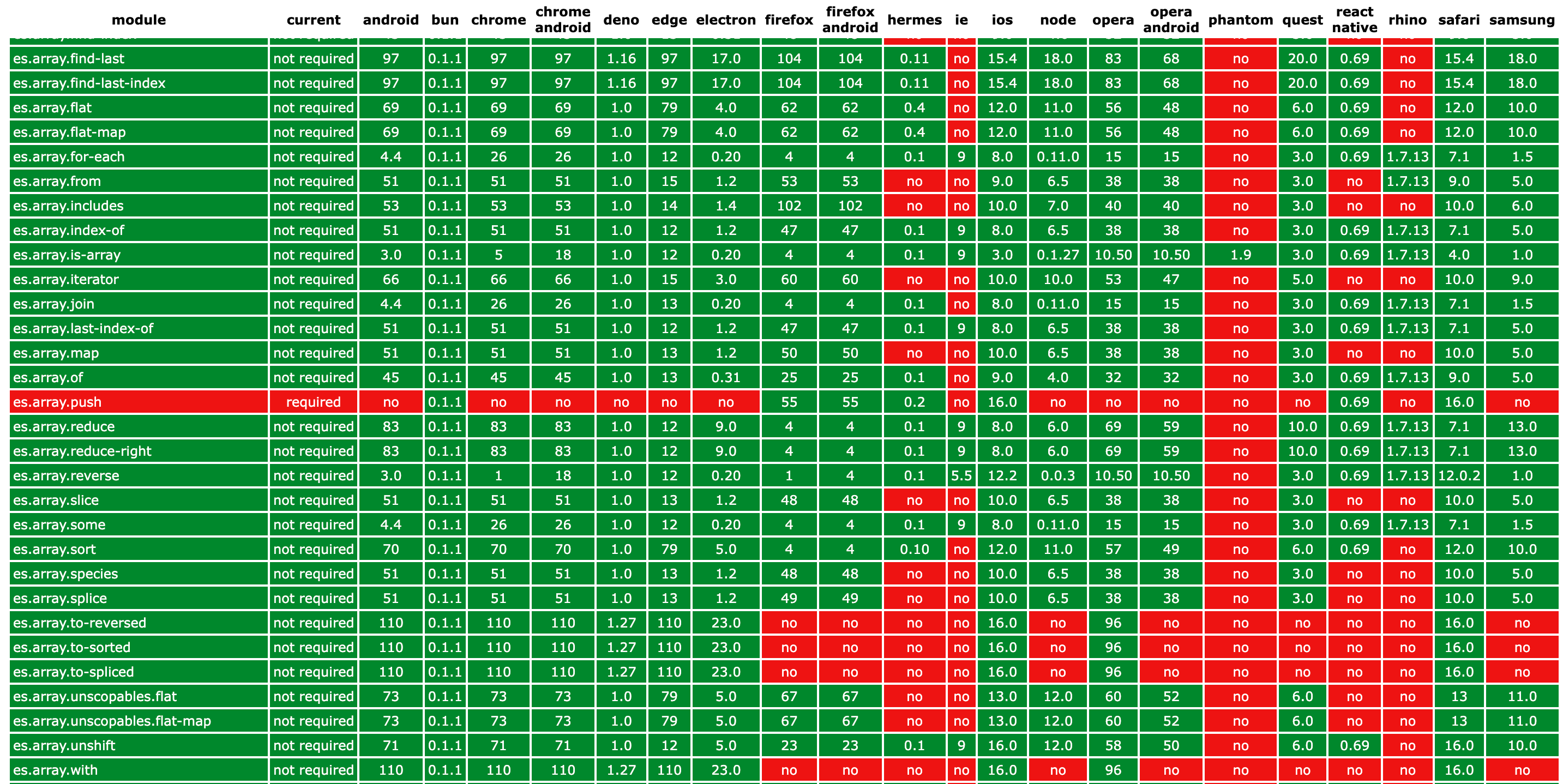
Coded With 💗 by
0x6ick